Hello Esri Community,
I’m new to using Arcade expressions and I’m currently working on designing a chart element for a dashboard. My goal is to group average scores into 5 distinct categories to improve the clarity of the visual representation in my pie chart.
Here’s what I’ve accomplished so far:
- I’ve successfully used the created an "averagescore" field (average of 10 different features) in Arcade and used that expression in a pie chart
- Currently, the pie chart displays all possible values calculated by the average, rather than categories or ranges
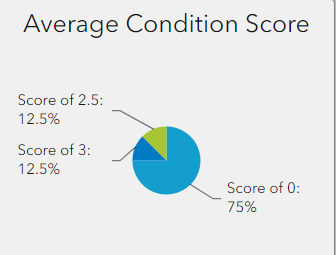
As more data is collected, this setup will likely become cluttered and less effective.
What I Need Help With: I want to categorize the average scores into 5 distinct groups so that the pie chart will be more organized and easier to interpret. Here are example category titles:
- Score Between 0 and 1.9
- Score Between 2 and 2.9
- Score Between 3 and 3.9
- Score above 4
Is there any way to do this within Arcade? Any advice or suggestions would be appreciated!
Here is my code so far:
//access steel structure results layer
var p = 'https://www.arcgis.com/'
var itemId = 'xyzxyzxyzxyzx'
var fs = FeatureSetByPortalItem(Portal(p), itemId, 0, ['Leg_1_Ftg_Score', 'Leg_2_Ftg_Score', 'Leg_3_Ftg_Score', 'Leg_4_Ftg_Score', 'Mid_Body_Score', 'Upper_Body_Arms_Score', 'score', 'Coating_Cond_Score', 'groundingscore', 'cathodicprotection_score' ], false);

//create empty dictionary
var fsDict = {
    'fields': [
        {'name': 'Leg_1_Ftg_Score', 'type': 'esriFieldTypeInteger'},
        {'name': 'Leg_2_Ftg_Score', 'type': 'esriFieldTypeInteger'},
        {'name': 'Leg_3_Ftg_Score', 'type': 'esriFieldTypeInteger'},
        {'name': 'Leg_4_Ftg_Score', 'type': 'esriFieldTypeInteger'},
        {'name': 'Mid_Body_Score', 'type': 'esriFieldTypeInteger'},
        {'name': 'Upper_Body_Arms_Score', 'type': 'esriFieldTypeInteger'},
        {'name': 'score', 'type': 'esriFieldTypeInteger'},
        {'name': 'Coating_Cond_Score', 'type': 'esriFieldTypeInteger'},
        {'name': 'groundingscore', 'type': 'esriFieldTypeInteger'},
        {'name': 'cathodicprotection_score', 'type': 'esriFieldTypeInteger'},
        {'name': 'averagescore', 'type': 'esriFieldTypeDouble'}
    ],
    'geometryType': '',
    'features': []
};

var index = 0;
//loop through features in the featureset to populate dictionary
for (var feature in fs) {
    fsDict.features[index++] = {
        'attributes': {
            'Leg_1_Ftg_Score': feature['Leg_1_Ftg_Score'],
            'Leg_2_Ftg_Score': feature['Leg_2_Ftg_Score'],
            'Leg_3_Ftg_Score': feature['Leg_3_Ftg_Score'],
            'Leg_4_Ftg_Score': feature['Leg_4_Ftg_Score'],
            'Mid_Body_Score': feature['Mid_Body_Score'],
            'Upper_Body_Arms_Score': feature['Upper_Body_Arms_Score'],
            'score': feature['score'],
            'Coating_Cond_Score': feature['Coating_Cond_Score'],
            'groundingscore': feature['groundingscore'],
            'cathodicprotection_score': feature['cathodicprotection_score'],
//calculate average and populate in dictionary
            'averagescore': (Number(feature['Leg_1_Ftg_Score']) + Number(feature['Leg_2_Ftg_Score']) + Number(feature['Leg_3_Ftg_Score']) + Number(feature['Leg_4_Ftg_Score']) + Number(feature['Mid_Body_Score']) + Number(feature['Upper_Body_Arms_Score']) + Number(feature['score']) + Number(feature['Coating_Cond_Score']) + Number(feature['groundingscore']) + Number(feature['cathodicprotection_score']))/10
        }
    }
}

//return feature set
return FeatureSet(Text(fsDict))
Please let me know what additional info may be helpful, if any. TIA!


