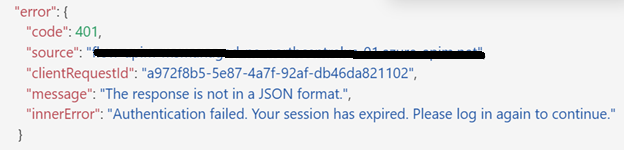
On 07/24/24 our service account user (managed by Microsoft Azure) who has login credentials for our ArcGIS Online instance began experiencing “Authentication Failed. Session Expired” errors multiple times throughout the day when executing a PowerAutomate flow.
At the end of the day, we setup a PowerAutomate flow to keep refreshing the credentials by logging into AGOL and 2 hours after setting up the flow the “Authentication Failed. Session Expire” error showed back up again and never resolved itself for the rest of the night. On 07/25/24, the issue stopped at 10am for unknown reasons. The error reappeared on 07/26 in the morning in a PowerAutomate flow owned by a personal account managed by active directory. Same error, different security.
How to do we prevent connections from losing authentication apparently randomly? We cannot figure out what is causing authentication loss. The issue is affecting production workflows. Below is the error message we keep seeing no matter what credentials are used in the Power Automate ArcGIS Connection.
We have followed these steps: https://community.esri.com/t5/arcgis-for-power-automate-blog/quick-tip-keeping-the-arcgis-connectors-for-power/ba-p/1499596

