I'm not sure if this is the right board, but I'm trying to figure out if my method of running automated Python tasks (using MS Task Scheduler) is correct for ArcGIS Pro (Python 3.x).
In our environment, I have a dedicated server where the scripts are stored, and ArcGIS Pro (3.3?) is installed there to get the Python 3.x installed. Pro is licensed through our ArcGIS Online account, and I have a dedicated login just for use with all of the Python scripts. I create a new instance of Python (through Pro) to add libraries (such as Pandas) and save this in a local directory with access permissions to everyone.
The Python scripts are run by using a batch file (i.e. DailyAPCDownload.bat) to access the correct Python version and the local py file, and look like:
"d:\python3\envs\propy05_17_2024\python.exe" "D:\Projects\Hastus_APC\DailyAPCDownload.py"
In the Task Scheduler, the run time is set to daily and the action is set to this batch file which looks like:
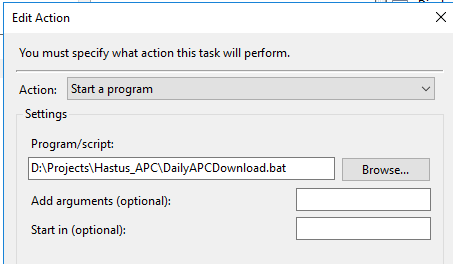
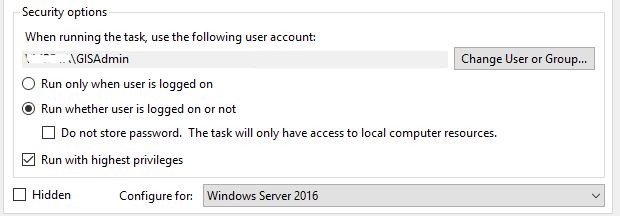
Every task is set to run using a system account, and to run when the user is not logged in using the highest privileges:
The scripts have started to use ArcGIS Python, but still rely a lot on Arcpy, and I call SQL Server stored procedures a lot, as in:
# -*- coding: utf-8 -*-
# --------------------------------------------------------------------------------
# DilaxDailyRailDownload.py
# Created on: .....
# Created by: Jeff W......
# Description: Pulls in daily Dilax rail ridership data
#  - see T:\Administration\OneNote\VM GIS.one for more information.
# ---------------------------------------------------------------------------

# Import modules
import arcpy, sys, os, xlrd, logging, logging.handlers
from arcgis.gis import GIS
from datetime import datetime, timedelta
from os import walk
import time
import pyodbc
import csv
import fnmatch
import random
import traceback

from email.mime.text import MIMEText
import email.utils
import smtplib
import pandas
import openpyxl

# Describe the Python version, documented at end in GIS_Process_Updates table
arcPyVersion = 3.9

org_url = 'https://www.arcgis.com'
emailHost = "aRelay.valleymetro.com"
emailList = ["someone@valleymetro.com","someoneelse@valleymetro.com"]
emailHeader = " * * * Message from APC data download * * * "

# Credentials to connect to ArcGIS Online
org_url = 'https://www.arcgis.com'
username = 'PlanningVM'
password = 'xyzxy' # password=getpass.getpass("Enter password:")

def emailResults(emailListIn, emailSubject, emailMsg, log):
    log.info("Sending emails to %s" % emailListIn)

    emailMsg = emailHeader + "\r\n" + emailMsg

    for emailID in emailListIn:

        try:
            emailFrom = "anEmailServer@valleymetro.com"
            emailTo = emailID
            now = datetime.now().strftime("%Y-%m-%d %H:%M:%S")
            message = emailMsg + now
            msg = MIMEText(message, "plain")
            msg["Subject"] = emailSubject
            msg["Message-id"] = email.utils.make_msgid()
            msg["From"] = emailFrom
            msg["To"] = emailTo

            SMTPserver = smtplib.SMTP(emailHost)
            SMTPserver.sendmail(emailFrom, emailTo, msg.as_string())
            SMTPserver.quit

        except Exception as e:
            log.info("** Error: %s" % sys.exc_info()[0])
            log.info(traceback.format_exc())
            log.info(e)

def main(date2Run):

    # Make a global logging object
    now = datetime.now()
    logDir = os.path.join(sys.path[0], "logs")
    reportDir = os.path.join(sys.path[0], "reports")
    logName = os.path.join(logDir, (now.strftime("APC_%Y-%m-%d_%H-%M.log")))

    finalReport = r"\\w-gis-file\gisdata\projects\APC\BusLoadLast14daysAll.xlsx"
    finalCSV = os.path.join(reportDir,"BusLoadLast14daysAll.csv")

    log = logging.getLogger("HastusAPC_" + str(random.random()) )
    log.setLevel(logging.INFO)

    h1 = logging.FileHandler(logName)
    h2 = logging.StreamHandler()

    f = logging.Formatter("[%(levelname)s] [%(asctime)s] [%(lineno)d] - %(message)s",'%m/%d/%Y %I:%M:%S %p')

    h1.setFormatter(f)
    h2.setFormatter(f)

    h1.setLevel(logging.INFO)
    h2.setLevel(logging.INFO)

    log.addHandler(h1)
    log.addHandler(h2)

    # Start logging
    log.info('Script: {0}'.format(os.path.basename(sys.argv[0])))

    # Set date variables
    dToday = date2Run
    if len(sys.argv) > 1:
        for arg in sys.argv[1:2]:
            dToday = datetime.strptime(arg, '%m/%d/%Y')
    sToday = dToday.strftime('%m/%d/%Y')

    # Parameter for the day to search for:
    dlxDay = dToday.strftime('%Y%d%m')
    log.info("Generated Day: %s" % dlxDay)
    log.info("Processing for %s" % sToday)
    print("Processing for %s" % sToday)

    # Set scratch geodatabase.  T drive for testing, generic for production.
    scratchGDB = "%scratchGDB%"

    # Parameter for the day to search for:
    dlxDay = dToday.strftime('%Y%m%d')

    # Establish connection to talk to SQL Server
    conn_str = (
        r'DRIVER=ODBC Driver 17 for SQL Server;'
        r'SERVER=SQL01\GIS;'
        r'DATABASE=ridership;'
        r'UID=GISAdmin;'
        r'PWD=xyzxyzx;'
        r'Trusted_Connection=yes;'
    )
    cnxn = pyodbc.connect(conn_str)
    cursor = cnxn.cursor()

    # Remove any existing rows for the daily input values
    strSQL = "Truncate Table APC_Data_In"
    cursor.execute(strSQL)
    cnxn.commit()

    # Parameter for the input Excel files (as a list)
    ##  APC data is located at
    APC_Dir = os.path.join(sys.path[0], "data")

    # Check that the directory for the input txt files exist
    if not os.path.exists(APC_Dir):
        log.info( "Missing APC_Dir")
        return 0

    files2Process = 0
    for (dirpath, dirnames, filenames) in walk(APC_Dir):
        try:
            dayBegin = date2Run - timedelta(hours=72, minutes=0)
            dayEnd = date2Run + timedelta(hours=24, minutes=0)
            for filename in fnmatch.filter(filenames, '*.txt'):
                newFile = os.path.join(dirpath, filename)
                mtime = datetime.fromtimestamp(os.stat(newFile).st_mtime)
                if (mtime >= dayBegin and mtime <= dayEnd):
                    files2Process += 1
                    readerCSV = csv.reader(open(newFile), delimiter=";")
                    log.info("Processing %s file" % newFile)
                    numRows = 1
                    for row in readerCSV:

                        if numRows > 0:

                            strSQL = "INSERT INTO HASTUS_APC_Data_In(BookingID, ShedType, TripID, RouteID, " \
                                "Direction, BlockID, Rank, StopID, StopDescription, " \
                                "ScheduleTime, DateMeasured, ArrivalTime, DepartureTime, Boardings, Alightings, Measurement, Source, " \
                                "LocationObs, TripID_Perm, PlaceID, PassengerLoad) " \
                                "VALUES ('" + row[0] + "', '" + row[1] + "', '" + row[2] + "', '" + row[3] + "', " \
                                "'" + row[4] + "', '" + row[5] + "', " + row[6] + ", '" + row[7] + "', '" + row[8].replace('\'', '\'\'') + "', " \
                                "'" + row[9] + "', '" + row[10] + "', '" + row[11] + "', '" + row[12] + "', " + row[13] + ", " + row[14] + ", '" + row[15] + "', '" + row[16] + "', " \
                                "'" + row[17] + "', " + row[18] + ", '" + row[20] + "', '" + row[21] + "')"
                            cursor.execute(strSQL)
                            cnxn.commit()
                        numRows += 1

        except: # catch *all* exceptions, close SQL connection, and stop Python execution
            log.info("** Error: %s" % sys.exc_info()[0])
            log.info(traceback.format_exc())
            emailResults(emailList, "APC Download ERROR", traceback.format_exc(), log)
            logging.shutdown()
            cnxn.close()
            sys.exit(0)

    # check that we processed some files, Otherwise, exit the routine
    if files2Process > 0:
        # Remove any duplicates from the Data In table
        log.info("Remove any duplicates (BookingID, TripID, RouteID, StopID, ArrivalTime, or DepatureTime) from the APC_Data_In table")
        try:
            strSQL = "{CALL [Ridership].[dbo].[ApcInRemoveDuplicates]}"
            cursor.execute(strSQL)
            cnxn.commit()
        except:  # catch *all* exceptions, close SQL connection, and stop Python execution
            log.info("** Error: %s" % sys.exc_info()[0])
            log.info(traceback.format_exc())
            emailResults(emailList, "APC Cleanup ERROR", traceback.format_exc(), log)
            logging.shutdown()
            cnxn.close()
            sys.exit(0)

        # Calculate the load by TripID
        log.info("Update the load by TripID in the APCByTrip table")
        try:
            strSQL = "{CALL [Ridership].[dbo].[APCLoadByTrip]}"
            cursor.execute(strSQL)
            cnxn.commit()
        except:  # catch *all* exceptions, close SQL connection, and stop Python execution
            log.info("** Error: %s" % sys.exc_info()[0])
            log.info(traceback.format_exc())
            emailResults(emailList, "APC Load By Trip ERROR", traceback.format_exc(), log)
            logging.shutdown()
            cnxn.close()
            sys.exit(0)

        # Remove any duplicates from the Load by Trip table
        log.info("Remove any duplicates (BookingID, TripID, RouteID, StopID, ArrivalTime, or DepatedTime) from the APCByTrip table")
        try:
            strSQL = "{CALL [Ridership].[dbo].[APCByTripRemoveDuplicates]}"
            cursor.execute(strSQL)
            cnxn.commit()
        except:
# catch *all* exceptions, close SQL connection, and stop Python execution
            log.info("** Error: %s" % sys.exc_info()[0])
            log.info(traceback.format_exc())
            emailResults(emailList, "APC Cleanup Trips ERROR", traceback.format_exc(), log)
            logging.shutdown()
            cnxn.close()
            sys.exit(0)

        # Move temporary Hastus APC data into permanent table.
        log.info("Move temporary APC_Data_In data into APC_Data table")
        try:
            strSQL = "{CALL [Ridership].[dbo].[APCMakePermanent]}"
            cursor.execute(strSQL)
            cnxn.commit()
        except:  # catch *all* exceptions, close SQL connection, and stop Python execution
            log.info("** Error: %s" % sys.exc_info()[0])
            log.info(traceback.format_exc())
            emailResults(emailList, "APC MakePermanent ERROR", traceback.format_exc(), log)
            logging.shutdown()
            cnxn.close()
            sys.exit(0)

        # Remove any duplicates from the permanent HASTUS_APC_Data table
        log.info("Remove any duplicates (BookingID, TripID, RouteID, StopID, ArrivalTime, or DepatureTime) from the APCByTrip table")
        try:
            strSQL = "{CALL [Ridership].[dbo].[APCRemoveDuplicates]}"
            cursor.execute(strSQL)
            cnxn.commit()
        except:  # catch *all* exceptions, close SQL connection, and stop Python execution
            log.info("** Error: %s" % sys.exc_info()[0])
            log.info(traceback.format_exc())
            emailResults(emailList, "APC Cleanup Trips ERROR", traceback.format_exc(), log)
            logging.shutdown()
            cnxn.close()
            sys.exit(0)

        # Export All Bus Load/Ridership Data for the last 14 days
        log.info("Exporting All for the last 14 days")
        try:
            param = ('All')
            strSQL = "{CALL [Ridership].[dbo].[APCGetBusLoadLast14] (?)}"
            cursor.execute(strSQL, param)
            cnxn.commit()
        except:  # catch *all* exceptions, close SQL connection, and stop Python execution
            log.info("** Error: %s" % sys.exc_info()[0])
            log.info(traceback.format_exc())
            emailResults(emailList, "APC All Export ERROR", traceback.format_exc(), log)
            logging.shutdown()
            cnxn.close()
            sys.exit(0)

        # Export to Excel file
        BusLoadTable = os.path.join(sys.path[0], r"Ridership on W-SQL01.sde\Ridership.DBO.BusLoadOutput")
        OutExcelAll = os.path.join(reportDir, "BusLoadLast14daysAll.xls")
        if os.path.exists(OutExcelAll):
            os.remove(OutExcelAll)
        arcpy.conversion.TableToExcel(Input_Table=BusLoadTable, Output_Excel_File=OutExcelAll)

        # Prepare the All inclusive Excel file using Pandas
        if os.path.exists(finalReport):
            os.remove(finalReport)
        outWriter = pandas.ExcelWriter(finalReport, engine='openpyxl')

        # Pandas
        cnxn2 = pyodbc.connect(conn_str)
        sqlStr = "Select * From Ridership.DBO.BusLoadOutput"
        data = pandas.read_sql(sqlStr, cnxn2)
        cnxn2.commit()
        Data = pandas.DataFrame(data)
        print(Data.columns.tolist())
        print(finalReport)
        Data.sort_values(by=['ArriveDate', 'RouteID'])
        Data.to_excel(finalReport, sheet_name="All")
        Data.to_excel(outWriter, sheet_name="All") #, index=False, engine='xlsxwriter')
        Data.to_csv(finalCSV, index=False)

        # Export Monday Data
        log.info("Exporting Mondays for the last 14 days")
        try:
            param = ('Monday')
            strSQL = "{CALL [Ridership].[dbo].[HASTUSGetBusLoadLast14] (?)}"
            cursor.execute(strSQL, param)
            cnxn.commit()
        except:  # catch *all* exceptions, close SQL connection, and stop Python execution
            log.info("** Error: %s" % sys.exc_info()[0])
            log.info(traceback.format_exc())
            emailResults(emailList, "APC Monday Export ERROR", traceback.format_exc(), log)
            logging.shutdown()
            cnxn.close()
            sys.exit(0)

        # Export to Excel file
        BusLoadTable = os.path.join(sys.path[0], r"Ridership on W-SQL01.sde\Ridership.DBO.BusLoadOutput")
        OutExcelMon = os.path.join(reportDir, "BusLoadLast14daysMon.xls")
        if os.path.exists(OutExcelMon):
            os.remove(OutExcelMon)
        arcpy.conversion.TableToExcel(Input_Table=BusLoadTable, Output_Excel_File=OutExcelMon)

        # Pandas
        sqlStr = "Select * From Ridership.DBO.BusLoadOutput"
        data = pandas.read_sql(sqlStr, cnxn2)
        cnxn2.commit()
        Data = pandas.DataFrame(data)
        Data.to_excel(outWriter, sheet_name="Monday")

        # Export Tuesday Data
        log.info("Exporting Tuesdays for the last 14 days")
        try:
            param = ('Tuesday')
            strSQL = "{CALL [Ridership].[dbo].[APCGetBusLoadLast14] (?)}"
            cursor.execute(strSQL, param)
            cnxn.commit()
        except:  # catch *all* exceptions, close SQL connection, and stop Python execution
            log.info("** Error: %s" % sys.exc_info()[0])
            log.info(traceback.format_exc())
            emailResults(emailList, "APC Tuesday Export ERROR", traceback.format_exc(), log)
            logging.shutdown()
            cnxn.close()
            sys.exit(0)

        # Export to Excel file
        BusLoadTable = os.path.join(sys.path[0], r"Ridership on W-SQL01.sde\Ridership.DBO.BusLoadOutput")
        OutExcelTues = os.path.join(reportDir, "BusLoadLast14daysTues.xls")
        if os.path.exists(OutExcelTues):
            os.remove(OutExcelTues)
        arcpy.conversion.TableToExcel(Input_Table=BusLoadTable, Output_Excel_File=OutExcelTues)

        # Pandas
        sqlStr = "Select * From Ridership.DBO.BusLoadOutput"
        data = pandas.read_sql(sqlStr, cnxn2)
        cnxn2.commit()
        Data = pandas.DataFrame(data)
        Data.to_excel(outWriter, sheet_name="Tuesday") #, index=false, engine='openpyxl')

        # Export Wednesday Data
        log.info("Exporting Wednesdays for the last 14 days")
        try:
            param = ('Wednesday')
            strSQL = "{CALL [Ridership].[dbo].[APCGetBusLoadLast14] (?)}"
            cursor.execute(strSQL, param)
            cnxn.commit()
        except:  # catch *all* exceptions, close SQL connection, and stop Python execution
            log.info("** Error: %s" % sys.exc_info()[0])
            log.info(traceback.format_exc())
            emailResults(emailList, "APC Wednesday Export ERROR", traceback.format_exc(), log)
            logging.shutdown()
            cnxn.close()
            sys.exit(0)

        # Export to Excel file
        BusLoadTable = os.path.join(sys.path[0], r"Ridership on W-SQL01.sde\Ridership.DBO.BusLoadOutput")
        OutExcelWed = os.path.join(reportDir, "BusLoadLast14daysWed.xls")
        if os.path.exists(OutExcelWed):
            os.remove(OutExcelWed)
        arcpy.conversion.TableToExcel(Input_Table=BusLoadTable, Output_Excel_File=OutExcelWed)

        # Pandas
        sqlStr = "Select * From Ridership.DBO.BusLoadOutput"
        data = pandas.read_sql(sqlStr, cnxn2)
        cnxn2.commit()
        Data = pandas.DataFrame(data)
        Data.to_excel(outWriter, sheet_name="Wednesday") #, index=false, engine='openpyxl')

        # Export Thursday Data
        log.info("Exporting Thursdays for the last 14 days")
        try:
            param = ('Thursday')
            strSQL = "{CALL [Ridership].[dbo].[APCGetBusLoadLast14] (?)}"
            cursor.execute(strSQL, param)
            cnxn.commit()
        except:  # catch *all* exceptions, close SQL connection, and stop Python execution
            log.info("** Error: %s" % sys.exc_info()[0])
            log.info(traceback.format_exc())
            emailResults(emailList, "APC Thursday Export ERROR", traceback.format_exc(), log)
            logging.shutdown()
            cnxn.close()
            sys.exit(0)

        # Export to Excel file
        BusLoadTable = os.path.join(sys.path[0], r"Ridership on W-SQL01.sde\Ridership.DBO.BusLoadOutput")
        OutExcelThurs = os.path.join(reportDir, "BusLoadLast14daysThurs.xls")
        if os.path.exists(OutExcelThurs):
            os.remove(OutExcelThurs)
        arcpy.conversion.TableToExcel(Input_Table=BusLoadTable, Output_Excel_File=OutExcelThurs)

        # Pandas
        sqlStr = "Select * From Ridership.DBO.BusLoadOutput"
        data = pandas.read_sql(sqlStr, cnxn2)
        cnxn2.commit()
        Data = pandas.DataFrame(data)
        Data.to_excel(outWriter, sheet_name="Thursday") #, index=false, engine='openpyxl')

        # Export Friday data
        log.info("Exporting Fridays for the last 14 days")
        try:
            param = ('Friday')
            strSQL = "{CALL [Ridership].[dbo].[APCGetBusLoadLast14] (?)}"
            cursor.execute(strSQL, param)
            cnxn.commit()
        except:  # catch *all* exceptions, close SQL connection, and stop Python execution
            log.info("** Error: %s" % sys.exc_info()[0])
            log.info(traceback.format_exc())
            emailResults(emailList, "APC Friday Export ERROR", traceback.format_exc(), log)
            logging.shutdown()
            cnxn.close()
            sys.exit(0)

        # Export to Excel file
        BusLoadTable = os.path.join(sys.path[0], r"Ridership on W-SQL01.sde\Ridership.DBO.BusLoadOutput")
        OutExcelFri = os.path.join(reportDir, "BusLoadLast14daysFri.xls")
        if os.path.exists(OutExcelFri):
            os.remove(OutExcelFri)
        arcpy.conversion.TableToExcel(Input_Table=BusLoadTable, Output_Excel_File=OutExcelFri)

        # Pandas
        sqlStr = "Select * From Ridership.DBO.BusLoadOutput"
        data = pandas.read_sql(sqlStr, cnxn2)
        cnxn2.commit()
        Data = pandas.DataFrame(data)
        Data.to_excel(outWriter, sheet_name="Friday") #, index=false, engine='openpyxl')

        # Export Weekend data
        log.info("Exporting Saturday and Sundays for the last 14 days")
        try:
            param = ('Weekend')
            strSQL = "{CALL [Ridership].[dbo].[APCGetBusLoadLast14] (?)}"
            cursor.execute(strSQL, param)
            cnxn.commit()
        except:  # catch *all* exceptions, close SQL connection, and stop Python execution
            log.info("** Error: %s" % sys.exc_info()[0])
            log.info(traceback.format_exc())
            emailResults(emailList, "APC Weekend Export ERROR", traceback.format_exc(), log)
            logging.shutdown()
            cnxn.close()
            sys.exit(0)

        # Export to Excel file
        BusLoadTable = os.path.join(sys.path[0], r"Ridership on W-SQL01.sde\Ridership.DBO.BusLoadOutput")
        OutExcelWeekend = os.path.join(reportDir, "BusLoadLast14daysWeekend.xls")
        if os.path.exists(OutExcelWeekend):
            os.remove(OutExcelWeekend)
        arcpy.conversion.TableToExcel(Input_Table=BusLoadTable, Output_Excel_File=OutExcelWeekend)

        # Pandas
        sqlStr = "Select * From Ridership.DBO.BusLoadOutput"
        data = pandas.read_sql(sqlStr, cnxn2)
        cnxn2.commit()
        Data = pandas.DataFrame(data)
        Data.to_excel(outWriter, sheet_name="Weekend") #, index=false, engine='openpyxl')

        cnxn2.close()

        outWriter.close()

    cnxn.close()

    log.info(".Sending email")
    newPre = datetime.now().strftime("%Y%m%d")
    log.info(newPre)
    msgDiff = "\r\n................................................................." + "\r\r\n"
    msgDiff += "Download of the latest HASTUS APC data is successful" + "\r\r\n"
    msgDiff += "Processing of HASTUS APC data is successful for %s" % sToday + "\r\r\n"
    msgDiff += "Processed data file is available at %s" % finalReport + "\r\r\n"
    msgDiff += "Process was completed on '" + newPre + " \r\r\n"
    msgDiff += "................................................................." + " \r\r\n"
    log.info(msgDiff)
    emailResults(emailList, "APC Download Successful", msgDiff, log)

    log.info("...Processing of APC data is successful for %s" % sToday)

    #Write information to the GIS_Process_Updates table
    log.info("...Writing results to GIS_Process_Updates table")
    cnxn3 = pyodbc.connect(conn_str)
    cursor3 = cnxn3.cursor()
    dToday = datetime.now() # + timedelta(hours=7)
    sToday = dToday.strftime('%m/%d/%Y %H:%M:%S')
    script = 'DailyAPCDownload.py'
    process = 'APC Daily Download'
    calledBy = 'DailyAPCDownload.bat'
    message = 'Successful'
    try:
        strSQL = "INSERT INTO [PortalData].[dbo].[GIS_Process_Updates]([DateEntered],[DateUpdated],[ProcessName],[ScriptName],[CalledBy],[Message],[ArcPyVersion],[CheckStatus])"
        strSQL += "VALUES('{0}','{1}','{2}','{3}','{4}','{5}','{6}', {7})".format(sToday, sToday, process, script, calledBy, message, arcPyVersion, -1)
        cursor3.execute(strSQL)
        cnxn3.commit()
    except:  # catch *all* exceptions, close SQL connection, and stop Python execution
        log.info("** Error: %s" % sys.exc_info()[0])
        log.info(traceback.format_exc())
        emailResults(emailList, "Daily bus download error", traceback.format_exc(), log)
        logging.shutdown()
        cnxn3.close()
        sys.exit(0)

    # Move Bus ridership values into the aggregate table DilaxBusData
    log.info("One last call to update Bus volume information")
    try:
        strSQL = "{CALL [Ridership].[dbo].[Generate30DayBusRailVolumes]}"
        cursor3.execute(strSQL)
        cnxn3.commit()
    except:  # catch *all* exceptions, close SQL connection, and stop Python execution
        log.info("** Error: %s" % sys.exc_info()[0])
        log.info(traceback.format_exc())
        emailResults(emailList, "Daily Bus Volume ERROR", traceback.format_exc(), log)
        logging.shutdown()
        cnxn3.close()
        sys.exit(0)

    cnxn3.close()

    log.info("Completed process in {0} script.".format(script))
    logging.shutdown()

    return 0

if __name__ == '__main__':

    # Run main function to pull data and process it
    main(datetime.strptime(datetime.now().strftime("%m/%d/%Y"), '%m/%d/%Y'))

    # Terminate all processes
    sys.exit(0)
I know it's a lot, but just for the example of how I used ArcPy, ArcGIS.GIS, and Pyodbc for connecting to SQL Server stored procedures (and sometimes being lazy and doing the SQL inline). I'm sure some of this could be cleaned up, but it's working, when Task Scheduler runs the program.
Under ArcMap, and Python 2.7 I rarely experienced an issue, but now that it's relying on Pro, every once in awhile I need to open Pro, check the Python environment ( a couple of times the created one went bad for some reason) and then close the application. Then everything works fine.
On July 13th something happened to the server and it rebooted. I was gone for a week, but when I returned none of the scripts were being run by Task Scheduler, and none had run since 7/13. I logged in as myself, and had no issue with running them through IDLE (for Pro), or through the BAT file. I logged into Pro and checked the Python environment and everything seemed fine, but nothing was running in Task Scheduler. Only after logging into the server using the service account, and then opening Pro and checking the environment, did things start working in Task Scheduler.
So my question (thanks for reading this far, I know this is supposed to be higher up, but I thought the buildup would help) is:
Does this setup seem like a reasonable way to run tasks automatically?
We have multiple scripts running every day and this new way of using ArcGIS Pro seems a little too sensitive. I wish there was someway to set the access and forget it, but maybe the accessing of the Pro license through ArcGIS Online should be localized?
I've looked through the help and only discovered these 2 questions that are close (and relatively recent), but they aren't exactly answering my question as to the best way to do this:
https://community.esri.com/t5/arcgis-pro-questions/run-pro-scheduled-task-with-service-account/m-p/1385617
https://community.esri.com/t5/arcgis-pro-questions/task-scheduler-for-gis-tasks-skipping-python/m-p/1413583
If anyone has any suggestions I would love to hear them.
Thanks