Hello all,
my colleagues and I are stumped. We are reviewing our end-users' disconnected geodatabase replica versions to see who is wayyy behind on geodatabase upgrades and SQL Server upgrades (we have no control over them, but can nudge their IT to pay attention to it..). All of them are using either SQL Server or SQL Server Express instances to house their enterprise geodatabases.
It's a pretty straightforward process. We right-click on the .sde connection within the Catalog pane, go to Properties, we then navigate to Geodatabase Version and Upgrade Status. From there, we can see if it's a 10.6.1 database, 10.8.1 database, 11.0, 11.2, etc...Piece of cake right?
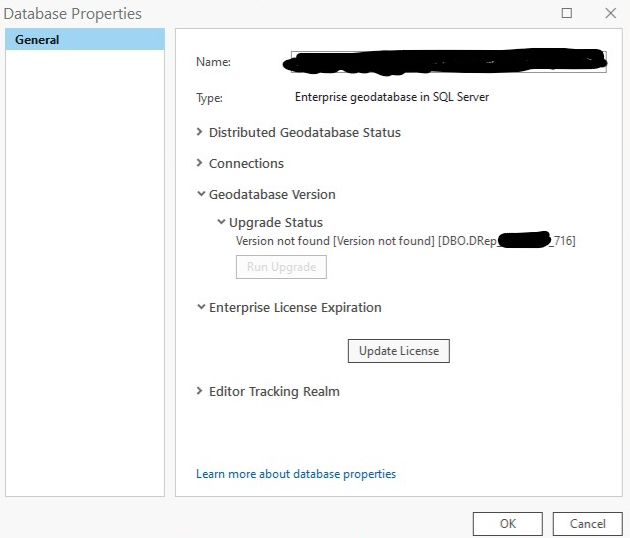
Well...a couple of our end-users have provided us with the following screenshots that say "version not found". Does anybody have any ideas as to what could be causing this message to display instead of a database version number? I do know that one of these users is currently on SQL Server 2014 with ArcGIS Pro 3.2. I'm not sure if that database version number is malfunctioning due to the archaic SQL Server version, or maybe a SQL permission is being denied by their IT for them to view that information? I definitely wanted to reach out and ask the community about this one. Thanks!
Example #1:
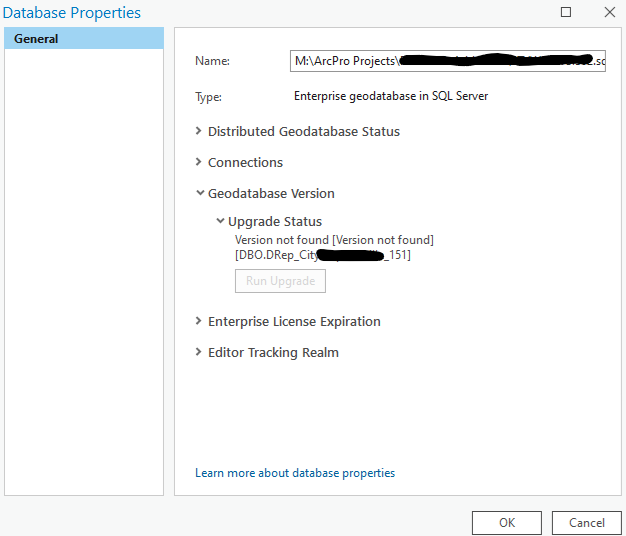
Example #2: