I have installed and configured an ArcGIS Monitor 2023.3.1 recently. Then, some users were added as an administrator.
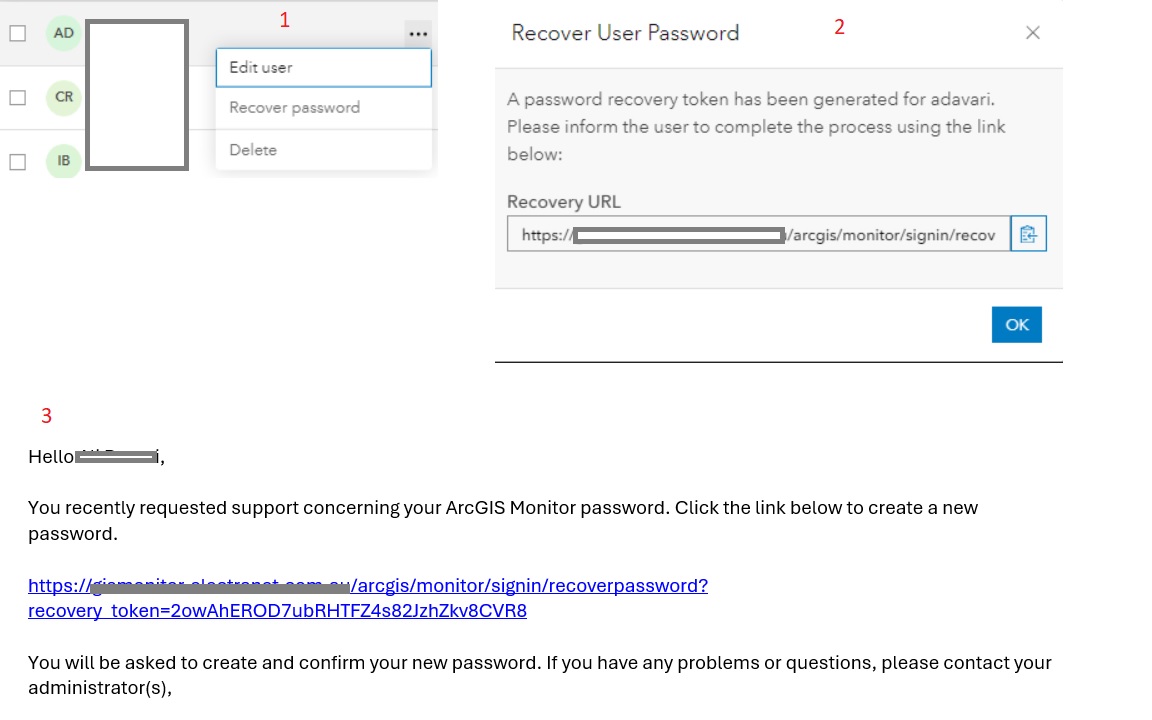
The users couldn't reset their passwords. I am taking the following steps to recover the password and send the token link to them to reset their password by themselves:
- Sign in to the ArcGIS Monitor via an administration (built-in) account
- Under Administration tab>Users>More options in front of each user (…)>Recover Password
- A password recovery token is generated for the user.
After I sent the token to the users they couldn’t reset the password. They keep getting a circular process. The link prompts them to enter their username and then sends them an email with a link to reset the password which then prompts them to enter the username which then sends an email…….life goes on in a circle.
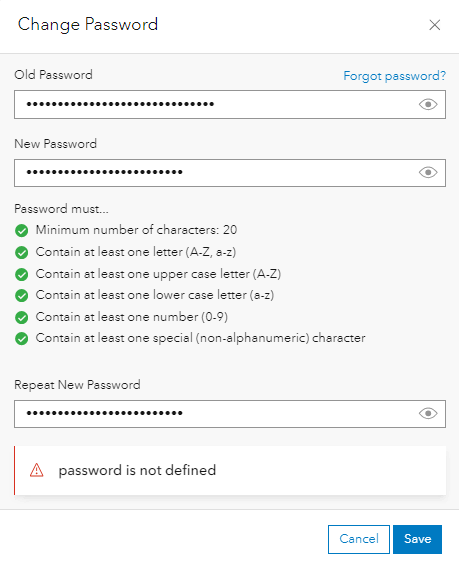
Also, resetting the password via the profile also returns an error (the password is not defined). please see the below screenshot.
Finally, from our testing we have found that initial user creation does not require you to have the secret question populated.
However, at first logon it asks you for an answer.
I think the issue will go away if the user gets set up with a default Secret question. Defeats the purpose of it but at least it allows the user to set their password.
Is this a defect or enhancement or if I am missing something in the configuration?
Any help would be highly appreciated!