I have a series of values in a field that I am trying to calculate the sum and display in an Indicator widget. Within that field, there are duplicate values that I do not want to include in the displayed total. Below is an example:
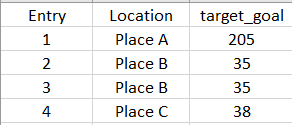
Currently, the value in my indicator reads 313. However, I want it to read 278 (subtraction of one 35 value).
I think using the Distinct function would allow me to do this, but I am having trouble getting that to work. Would I need to create a Data Expression and call out that new field to sum or can I do this in the Advanced formatting editor itself?
This is what I have started in a new Data Expression:
var fs = FeatureSetByPortalItem(
  Portal("https://www.arcgis.com/"),
  "384158f2ebe34f8ba8b0b39dfe5f5af5",
  0,
  ['target_goal'],
  false
);

var rem_dups = Distinct('target_goal')

return rem_dups
@jcarlson any thoughts on this?


