Hello everybody,
I am using the ArcGIS API for JavaScript version 4.24. I have created an HGIS (Historical Geographic Information System) application for the tribes of Arabia. My map consists of multiple genealogically layered overlays. When I click on a territory of a tribe, I can retrieve a list of successive parent tribes to which it belongs in the form of clickable buttons, and this works perfectly.
On the buttons for the parent tribes, I intended to display the "Name" attribute, which is in English and Arabic. It displayed correctly with test data, but after publishing my data to ArcGIS Online, I am unable to access all my attributes. The console log only provides the ID and the "Name_en" attribute. However, using the 'PopupTemplate' I can retrieve all attributes.
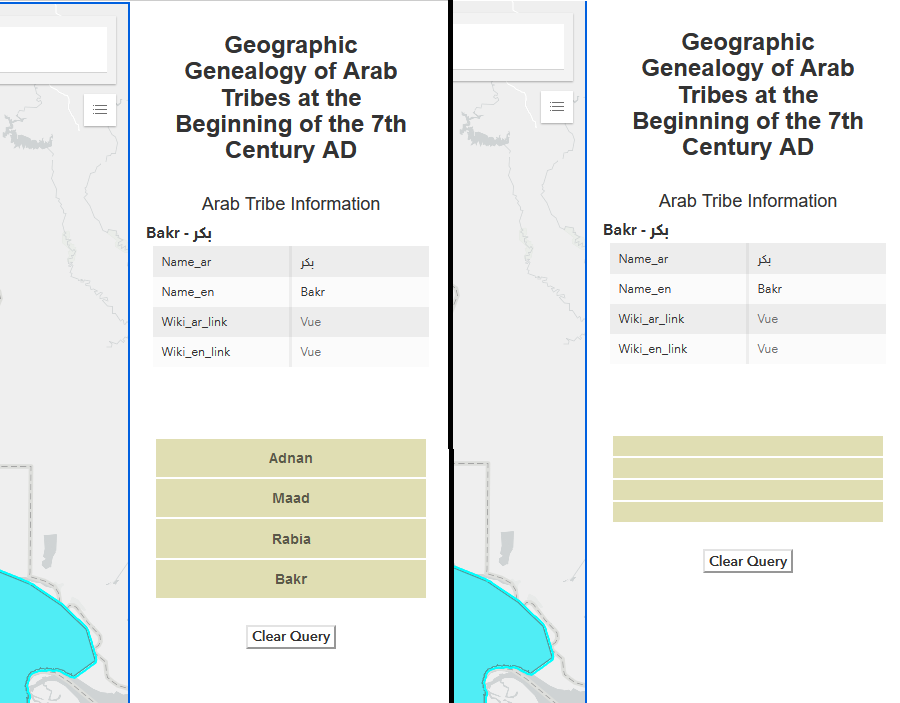
Below is a snippet of my code, along with screenshots showing the list display with the "Name_en" attribute and the empty list display when I use the "Name" attribute.
let poptemp;

// Create PopupTemplate for displaying information
poptemp = new PopupTemplate({
    title: "{Name}",
    content: [{
        type: "fields",
        fieldInfos: [{
            fieldName: "Name_ar",
            label: "Name_ar"
        }, {
            fieldName: "Name_en",
            label: "Name_en"
        }, {
            fieldName: "Wiki_ar_link",
            label: "Wiki_ar_link"
        }, {
            fieldName: "Wiki_en_link",
            label: "Wiki_en_link"
        }]
    }]
});

let Mygraphic = new Graphic({
    popupTemplate: poptemp
});

const Mycontainer = document.getElementById("gridDiv");
Mycontainer.innerHTML = "";

const listNode = document.getElementById("new_graphic");

let feature_1 = new Feature({
    graphic: Mygraphic,
    view: view,
    container: Mycontainer
});

let highlight;

let results;
let result;

// Event handler for list item clicks
function onListClickHandler(event) {
    const target = event.target;
    const resultId = target.getAttribute("data-result-id");
    result = resultId && results && results[parseInt(resultId, 10)];

    view.whenLayerView(result.graphic.layer).then(function (layerView) {
        if (result && results.length > 0) {
            highlight && highlight.remove();

            view
                .goTo(result.graphic.geometry.extent.expand(1))
                .then(function () {
                    result.graphic.layer.popupTemplate = poptemp;
                    feature_1.graphic = result.graphic;
                    highlight = layerView.highlight(result.graphic);
                    handleClick(result);
                });
        } else {
            feature_1.graphic = graphic;
        }
    });
};

// Function to update the displayed list
function updateList(results) {
    const fragment = document.createDocumentFragment();
    results = results.reverse();

    results.forEach(function (result, index) {
        const attributes = result.graphic.attributes;
        const li = document.createElement("li");
        li.classList.add("panel-result");
        li.tabIndex = index;
        li.setAttribute("data-result-id", index);
        li.textContent = attributes.Name;

        fragment.appendChild(li);
    });

    listNode.innerHTML = "";
    listNode.appendChild(fragment);
    listNode.style.display = "block";
    listNode.addEventListener("click", onListClickHandler);
};
Thank you in advance for your help.
Karim




