Hi all,
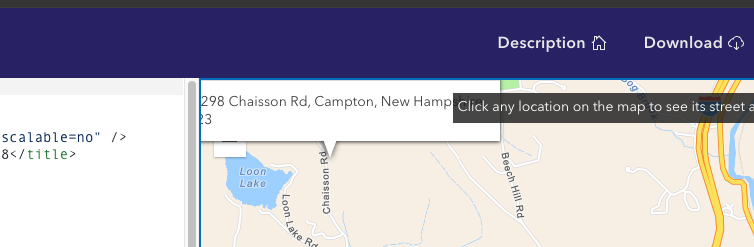
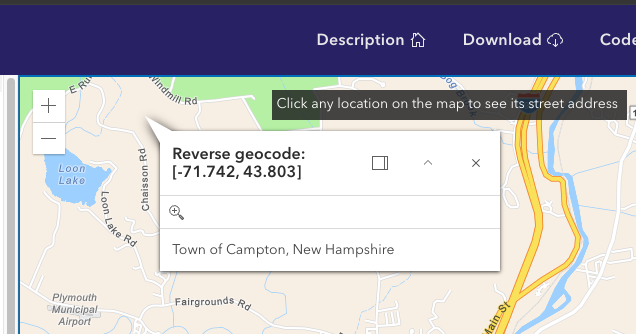
I am experiencing an issue where on the first click after a page load, (with default settings) the popup always opens above the click location, causing it to overflow the div and end up out of view. Every click after first seems to reliably work and doesn't collide with the edge of the map. Is this a known issue or am I missing a way to avoid this without docking the popup or something? I am able to reproduce this problem in the sample code snippets. https://developers.arcgis.com/javascript/latest/sample-code/intro-popup/See below:first click after page load
second click (and beyond) after page load
I've found the default Popup positioning tends to be unreliable, but fortunately you can override the default behavior by assigning a function to the alignment property. I've modified the aforementioned sample below with what my apps use. In particular, I added lines 52-80, and also the reference to reactiveUtils on line 35.
<html lang="en">
  <head>
    <meta charset="utf-8" />
    <meta name="viewport" content="initial-scale=1,maximum-scale=1,user-scalable=no" />
    <title>Intro to popups | Sample | ArcGIS Maps SDK for JavaScript 4.28</title>

    <style>
      html,
      body,
      #viewDiv {
        padding: 0;
        margin: 0;
        height: 100%;
        width: 100%;
      }

      #instruction {
        z-index: 99;
        position: absolute;
        top: 15px;
        left: 50%;
        padding: 5px;
        margin-left: -175px;
        height: 30px;
        width: 355px;
        background: rgba(25, 25, 25, 0.8);
        color: white;
      }
    </style>

    <link rel="stylesheet" href="https://js.arcgis.com/4.28/esri/themes/light/main.css" />
    <script src="https://js.arcgis.com/4.28/"></script>

    <script>
      require(["esri/rest/locator", "esri/Map", "esri/views/MapView", "esri/core/reactiveUtils"], (locator, Map, MapView, reactiveUtils) => {
        // Set up a locator url using the world geocoding service
        const locatorUrl = "https://geocode.arcgis.com/arcgis/rest/services/World/GeocodeServer";

        // Create the Map
        const map = new Map({
          basemap: "streets-navigation-vector"
        });

        // Create the MapView
        const view = new MapView({
          container: "viewDiv",
          map: map,
          center: [-71.6899, 43.7598],
          zoom: 12
        });

        reactiveUtils.watch(() => view.popup?.id, function() {
    			view.popup.alignment = function() {
    				var location = this.location;
    				var view = this.view;

    				if ((location) && (view)) {
    					var viewPoint = view.toScreen(location);
    					var y2 = view.height / 2;
    					var x2 = view.width / 3;
    					var x3 = x2 * 2;

    					if (viewPoint.y >= y2) {
    						if (viewPoint.x < x2)
    							return "top-right";
    						else if (viewPoint.x > x3)
    							return "top-left";
    					} else {
    						if (viewPoint.x < x2)
    							return "bottom-right";
    						else if (viewPoint.x > x3)
    							return "bottom-left";
    						else
    							return "bottom-center";
    					}
    				}

    				return "top-center";
    			};
        });

        /*******************************************************************
         * This click event sets generic content on the popup not tied to
         * a layer, graphic, or popupTemplate. The location of the point is
         * used as input to a reverse geocode method and the resulting
         * address is printed to the popup content.
         *******************************************************************/
        view.popupEnabled = false;
        view.on("click", (event) => {
          // Get the coordinates of the click on the view
          const lat = Math.round(event.mapPoint.latitude * 1000) / 1000;
          const lon = Math.round(event.mapPoint.longitude * 1000) / 1000;

          view.openPopup({
            // Set the popup's title to the coordinates of the location
            title: "Reverse geocode: [" + lon + ", " + lat + "]",
            location: event.mapPoint // Set the location of the popup to the clicked location
          });

          const params = {
            location: event.mapPoint
          };

          // Display the popup
          // Execute a reverse geocode using the clicked location
          locator
            .locationToAddress(locatorUrl, params)
            .then((response) => {
              // If an address is successfully found, show it in the popup's content
              view.popup.content = response.address;
            })
            .catch(() => {
              // If the promise fails and no result is found, show a generic message
              view.popup.content = "No address was found for this location";
            });
        });
      });
    </script>
  </head>

  <body>
    <div id="viewDiv"></div>
    <div id="instruction" class="esri-widget">Click any location on the map to see its street address</div>
  </body>
</html>
Thanks for this! Worked great, I packaged it up into a little function:
// Set the popup alignment based on the location of the popup
export function setPopupAlignment(view: SceneView | MapView) {
    reactiveUtils.watch(() => view.popup?.id, function () {
        view.popup.alignment = function () {
            const { location, view } = this;

            if ((location) && (view)) {
                const viewPoint = view.toScreen(location);
                const y2 = view.height / 2;
                const x2 = view.width / 3;
                const x3 = x2 * 2;

                if (viewPoint.y >= y2) {
                    if (viewPoint.x < x2)
                        return "top-right";
                    else if (viewPoint.x > x3)
                        return "top-left";
                } else {
                    if (viewPoint.x < x2)
                        return "bottom-right";
                    else if (viewPoint.x > x3)
                        return "bottom-left";
                    else
                        return "bottom-center";
                }
            }

            return "top-center";
        };
    });
}
Signed in members can post, follow updates, and more. New here? Register a free account.
Find useful guides, FAQs, and documents to help you navigate and make the most of Esri Community.