Is there a way to interweave layer drawing order? E.g., there are three layers, and I want layer 1 to draw on top of layer 2 but under layer 3. I want layer 2 to draw on top of layer 3. In the example below, the thick pink/peach line is a road, the magenta line is a "park zones" boundary, and the dashed black line is the city limits. I want the park zones to draw on top of the road, but under the city limits. I want roads on top of city limits.
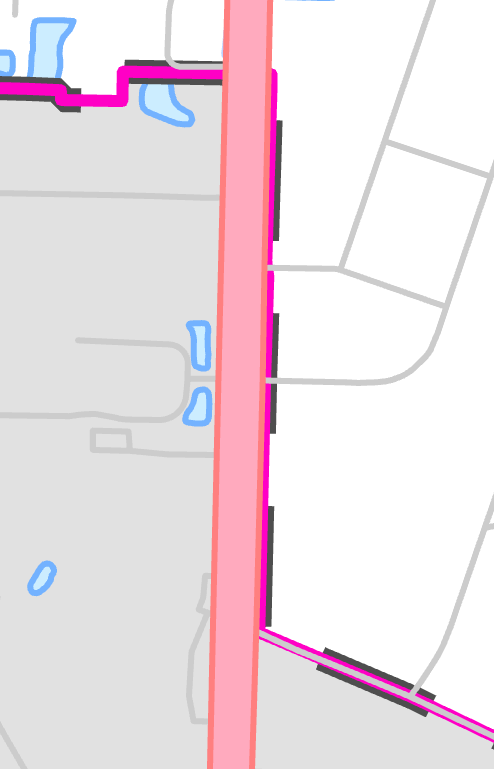
I swear I did something like this years ago in ArcMap, involving group layers and advanced symbol layer drawing. But I can't remember how I did it. What I'm trying to do now doesn't involve symbol layers, just separate feature layers, though I guess it could involve symbol layers if that's the trick to getting this to work. And/or maybe it involved duplicating layers? Am I misremembering what is possible? Does Pro handle this differently than ArcMap did? Thank you for any insight!

