ArcGIS Pro 2.6.8, Oracle 18c 10.7.1 EGDB; SDE.ST_GEOMETRY
It's possible to set a SHAPE field to null using the attribute table, field calculator, Python, and SQL. Here's how to do it with the field calculator:
Right-click the SHAPE field —> Field Calculator —> Type None —> Apply.
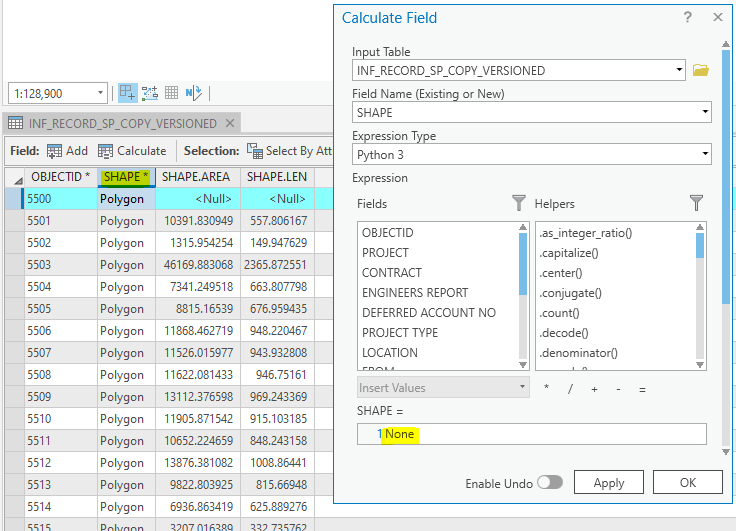
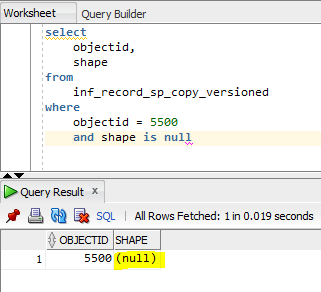
Verify that the SHAPE is now null by querying in a SQL client like SQL developer:
In the attribute table in ArcGIS Pro, the SHAPE is still shown as "Polygon", even though the SHAPE is really null in the underlying table:
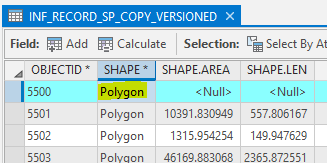
So that makes me think that the "Polygon" text is kind of fake, for lack of a better word. Maybe ArcGIS Pro just grabs that text from the FC system tables and uses it to show something in the SHAPE field -- for the whole field, regardless if the shapes are populated or not.
Could that behaviour be changed so that null SHAPEs are displayed as <Null>?





