Hello everyone,
I am trying to create a multi-level layer hierarchy of group layers with ArcPy.
Consider the following example:
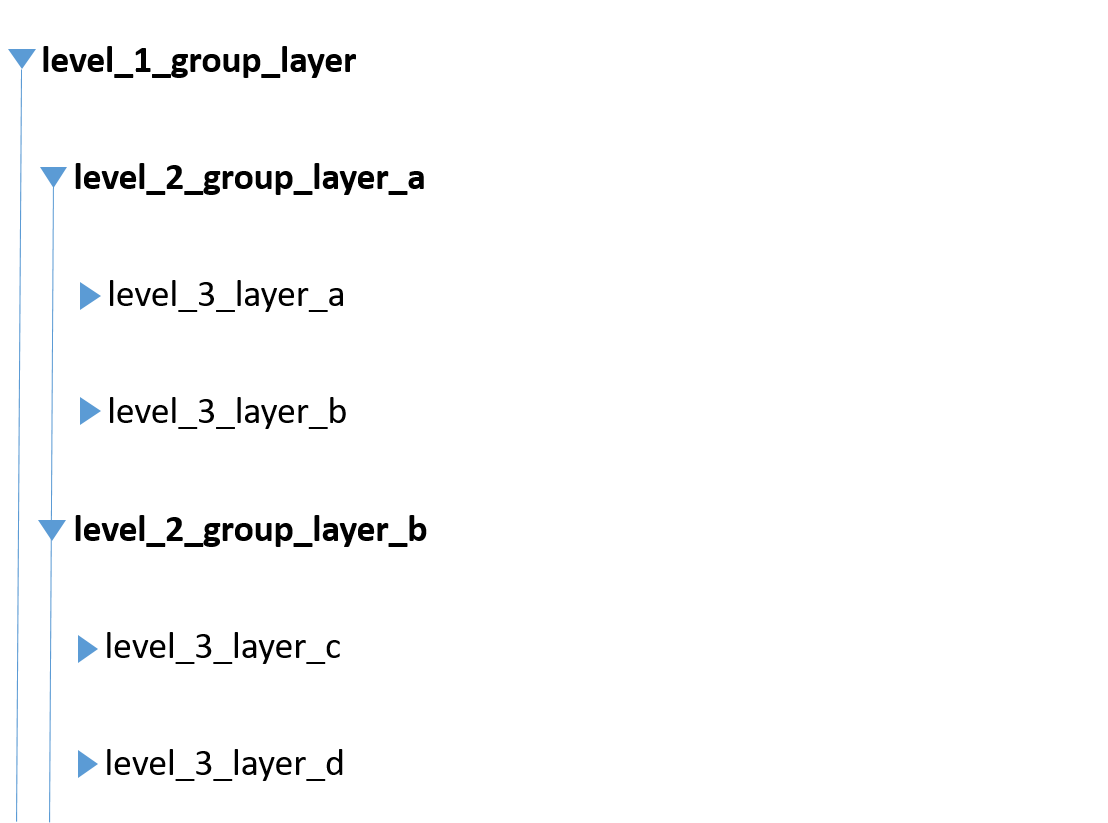
At the top of the hierarchy, let's say I have a group layer named level_1_group_layer. This group layer has two group layers as children, level_2_group_layer_a and level_2_group_layer_b. Each of these two group layers has two "normal" layers as children (level_3_layer_a and level_3_layer_b as children of level_2_group_layer_a, level_3_layer_c and level_3_layer_d as children of level_2_group_layer_b).
Is there a way to achieve this nested hierarchy of group layers via ArcPy?
I am able to place "normal" layers (e.g. level_3_layer_a and level_3_layer_b) below a group layer (e.g. level_2_group_layer_a). For this, I am using the method addLayerToGroup(group, layer) of the activeMap object as described here: Solved: Is it possible to create a new group layer with ar... - Esri Community
However, so far, I was not successful in adding a group layer (e.g. level_2_group_layer_a) as a child of another group layer (e.g. level_1_group_layer).
- Trying to use the method addLayerToGroup(level_1_group_layer, level_2_group_layer_a) results in an exception: Traceback (most recent call last):
File "<string>", line 114, in <module>
File "<string>", line 53, in remove_layer_from_map__and__place_layer_below_group_layer
File "C:\Program Files\ArcGIS\Pro\Resources\ArcPy\arcpy\utils.py", line 191, in fn_
return fn(*args, **kw)
File "C:\Program Files\ArcGIS\Pro\Resources\ArcPy\arcpy\_mp.py", line 2593, in addLayerToGroup
return convertArcObjectToPythonObject(self._arc_object.addLayerToGroup(*gp_fixargs((target_group_layer, add_layer_or_layerfile, add_position), True)))
ValueError: <MappingLayerObject object at 0x000001701373CED0> - For activeMap, I found the method moveLayer(reference_layer, move_layer, {insert_position}) (Map—ArcGIS Pro | Documentation) which from the description seems to be exactly what I need (with e.g. level_1_group_layer as reference_layer and level_2_group_layer_a as move_layer). However, for the parameter insert_position, only the values "AFTER" and "BEFORE" are available. For "AFTER", it is stated that it "inserts the new layer after or below the reference layer". When I now call active_map.move_layer(level_1_group_layer, level_2_group_layer_a, "AFTER"), level_2_group_layer_a is inserted after level_1_group_layer, i.e. on the same hierarchy level. Is there any way to a ensure it is inserted below , i.e. that level_2_group_layer_a will be one level below level_1_group_layer in the layer hierarchy?
Am I using the methods incorrectly? Or are there alternative ways to achieve the nested hierarchy of group layers? Any help is very much appreciated!



