Hi All. Super sorry this is so long, but it's complex stuff.
I'm trying to clip a 48-MB, 1-band raster. I started with Toolboxes' "Clip Raster" tool but gave-up after waiting half a day. Checking this forum, it was suggested to instead "Extract by Mask", which actually worked, and quickly, but upon close examination, it appears to have reevaluated and modified the resulting raster's cell values. Below, you'll see where all values have been elevated/lightened.
Original raster - group of cells:

Extracted raster - same group of cells:

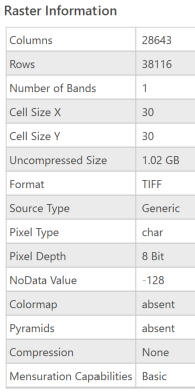
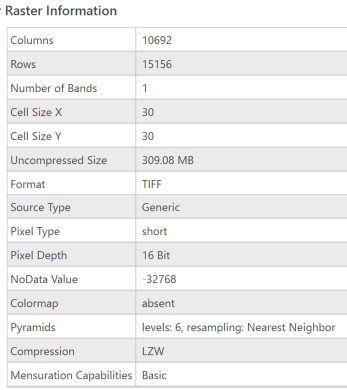
Both rasters above still claim a single-band value range of 0-81, but the Extracted raster appears to have "overexposed" the data, lightening all its values and eliminating its highest. My guess is that the process clips out the unwanted cells, then reevaluates what remains, redistributing the value spectrum across the new-raster cells. The Raster Information tables throw all sorts of red flags too, namely, Columns, Rows, Size, Pixel Type and Depth, NoData Value, and Pyramids, so it seems evident that Extract by Mask might not work here, since most of these parameters are not editable in the tool's Environments.
Alternatively, via Pro's tabs, the Analysis > Clip tool (Analysis > Raster > Raster Functions > System > Data Management > Clip) offers even fewer parameter adjustments.
This leads me to believe that the Geoprocessing > Clip Raster tool (Geoprocessing > Toolboxes > Data Management Tools > Raster > Raster Processing > Clip Raster), which does allow adjustment of many of the Raster Information parameters, is the only way to clip without losing data (assuming that IS what's actually happening).
So my questions are:
- Is there a way Extract by Mask can work without altering the original cell values? If not,
- Will Geoprocessing > Clip Raster tool eventually work if i let it spin long enough? If so,
- Is there an adjustable parameter that will retain the original raster-cell values?


