Hi,
I am looking for a way to get the height of selected buildings, either in the report, inspector, or as a .csv, to later make height adjustments for specific buildings.
My goal is to compute stats of buildings along specific street sections and then modify the height of certain buildings - ideally, I'd get a table with an ID for every building and its height.
I tried to get the heights manually by converting each model to a shape, selecting the highest point, read the y-vertex value from the inspector and save that into an excel file, and then modify the y-vertices in a copy of the scene - that approach worked, but is not really feasbile given the amount of buildings.
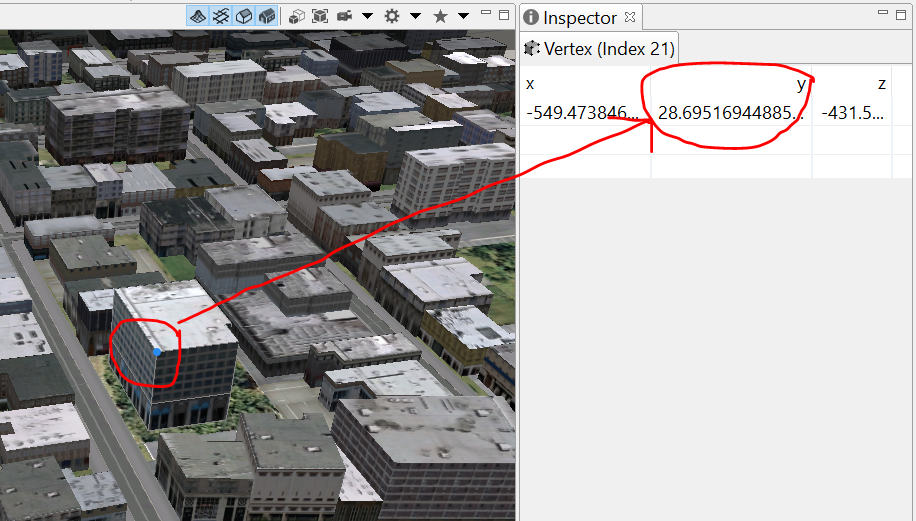
I am a total cga beginner.. I could manage to get the cga file I am using (a modified version of International City.cga, created on 6 Nov 2013 by Esri R&D Center Zurich) to show the attribute buildingHeight in the inspector, however, modifying the value does not change the height of a building and the code line for unhiding attr buildingHeight in the inspector is not really where it would be logical. This is part of the code:
######################################################
# control attributes (set by user or mapped)
#
@Group("Building") # ("Building",1) deleted, seemed unnecessary
@Order(1) @Range("Highrise Building","Office Building","Apartment Building","Residential","Open Space") @Order(1)
attr Type = getType
#@Order(2) @Range(0.5,10) # my comment: I increased the range from (0.5,2) to (0.5,10)
attr HeightFactor = 1
# my comment: the following showed building height in the inspector but really weird numbers
# attr HeightFactor = getBuildingHeight
# the following 2 lines erase all of the CGA annotations for rules in the inspector...
#@Order(3) @Range(1,400) # I increased the range from (0.5,2) to (0.5,10)
#attr buildingHeight = HeightFactor
# @Group("Trees", 3) #,3 deleted (didnt know what it does)
@Group("Trees")
@Order(1) @Range("None","Fan","Model","Analytical") @Description("Do not generate Models for whole city i.e. take care with polygon counts!")
attr ShowTrees = "Fan"
@Order(2) @Range("Random Forest","Tropical","Zone 6 Trees")
attr Mix = "Zone 6 Trees"
###################################################
# Residential
#
# unhide the attribute building height in inspector like this:
attr buildingHeight = 1
# getBuildingHeight didn't work
# these attributes are hidden in the inspector:
@Hidden
attr groundFloorHeight = 0
Can anyone help?





