I have a feature service that identifies where we have soils data / resources. I have a related table that provides details to all of those resources. I am trying to configure the pop-up so that all the details appear when a user clicks on a polygon. The code that I use is included below:
var tbl = OrderBy(FeatureSetById($datastore, "1"), 'Data_Source_Type DESC');
var primarykey = $feature.GlobalID;
var sql = "ParentGlobalID = '" + primarykey + "'";
Console(sql);
var relatedrecords = Filter(tbl, sql);
var popupString = ''
for (var f in relatedrecords){
popupString +=
"Data Source Name: " +
f.Data_Source_Name + TextFormatting.NewLine +
"Data Source Type: " +
f.Data_Source_Type + TextFormatting.NewLine +
"National Soil Database ID: " +
DefaultValue(f.NSDB_ID, 'N/A') + TextFormatting.NewLine +
"Soils Report Number: " +
DefaultValue(f.Soils_Report_Num, 'N/A') + TextFormatting.NewLine +
"Year Soils Report was Published: " +
f.Publishing_Year + TextFormatting.NewLine +
"Mapping Scale: " +
f.Mapping_Scale + TextFormatting.NewLine +
"Metadata URL: " +
f.Metadata_URL + TextFormatting.NewLine +
"Data Download URL: " +
f.Data_Download_URL + TextFormatting.NewLine +
TextFormatting.NewLine
}
return popupString;
It gives me exactly what I want. The only thing missing is some formatting.
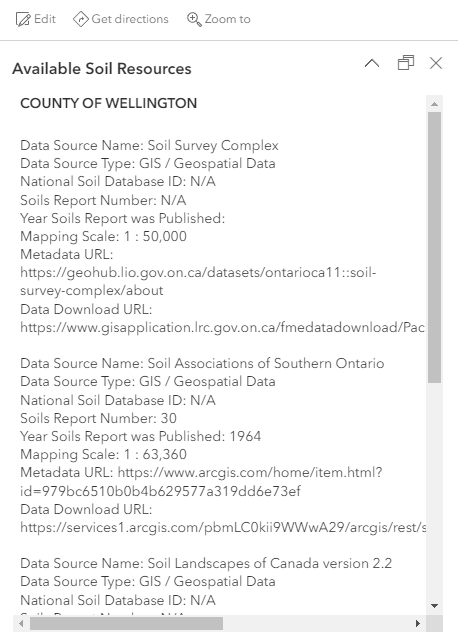
For example, I would really like to have the field headings bolded and have my hyperlinks displayed properly.
In a perfect world I would love to just be able to use code as follows:
<b>"Data Source Name: " </b> +
f.Data_Source_Name + TextFormatting.NewLine +
But I know that's not how it works.
If anyone could provide me with some guidance or additional resources I would greatly appreciate it.
Thanks everyone.
~Dan



