Hello, I have enjoyed working with Branch Versioning for the past several months. For the most part using Branch Versioning is relatively simple and easy to administer. Here is the issue I am facing and I realize that there may not be a simple solution.
Using a vpn connection to the enterprise geodatabase, it seems connections based on the containing server IP address can cause a minor inconvenience in that opening the project back up (after saving) re-sets the database connection using the same IP address with a (#) sequential number at the end.
For example: 12.200.150.24(4)
When this happens (most every time) the database needs to be re-registered with the ArcGIS Server. Again, this is a minor inconvenience. However, it seems by adding a record in the hosts file so the server's name can be used maintains the connection after saving, closing and re-opening the project.
So far so good, and this is where my issue begins:
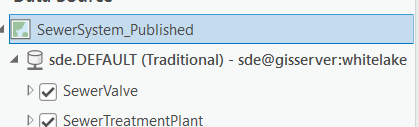
After creating a new DB connection using the server's name and setting the new connection to Branch Versioning as well as setting and confirming the datasets and individual Feature Class to Branch Version, I use the update data source process to move the layers in ArcGIS Pro to point to the new connection. All works well and it seems everything is in alignment EXCEPT in the table of contents, which indicates the the connection is still Traditional. This seems to cause problems in publishing to a Portal installation.
I have tried several ideas to update this so that the connection (as shown in the TOC) reflects as being Branch. I realize I could re-create from scratch; however, I have several database connections to process in the same manner. Any suggestion or idea shared on how to handle this will be gratefully received.
James Armstrong