Hi. Thanks for any help. Having issue with ApplySymbologyFromLayer in my script tool.
Goal of tool is to take two bands from an image and produce a 2D histogram as a new raster layer with just a row/col coordinate system. The histogram is a 256x256 raster with row/col positions indicating the 8bit brightness values in the two bands. Pixel values represent counts of pixels in the original image with the given brightness value pair.
I want to provide a layer file to symbolize the histogram raster and a layout file that adds a layout with grid and legend. The first time the tool is used in a Pro project, the layout file is imported that contains a map named 'Histogram' which is also created upon import of the layout.
I'm finding that on first usage in a new project, the symbology from the layer is not applied to the histogram raster. Any subsequent usage of the tool in that same project does successfully apply the symbology.
Simplified code that just creates a dummy 256x256 output raster, but still replicates the problem:
import arcpy
import numpy as np

outRasterName = arcpy.GetParameterAsText(0)   # raster output to FGDB
histlyrx = arcpy.GetParameter(1)    # layer file input for raster symbology
histlayout = arcpy.GetParameter(2)   # layout file input

# create NumPy array to be dummy output raster for demo
hist2D_arr = np.zeros((256,256), dtype='uint32')

# NumPyArrayToRaster(); write out to file geodatabase
outRaster = arcpy.NumPyArrayToRaster(hist2D_arr)
outRaster.save(outRasterName)

# import layout file if needed; also creates map 'Histogram' which is in layout
currProject = arcpy.mp.ArcGISProject("CURRENT")
layoutList = currProject.listLayouts("HistogramLayout")
if not(layoutList):
    currProject.importDocument(histlayout)

# confirm if map named 'Histogram' is present in the current Project. If not,
# issue error message.
histMapList = currProject.listMaps("Histogram")
if histMapList:
    arcpy.AddMessage("Histogram map is present.\n")
    histMap = histMapList[0]
    histlyr = histMap.addDataFromPath(outRasterName)
    histlyr = arcpy.management.ApplySymbologyFromLayer(histlyr, histlyrx)
    arcpy.AddMessage(histlyr)
else:
    arcpy.AddError("No map named Histogram found.")

# Use SetParameter to associate the derived layer required by
# ApplySymbologyFromlayer to the corresponding item in the parameter list
arcpy.SetParameter(3,histlyr)The tool parameters are set up as:
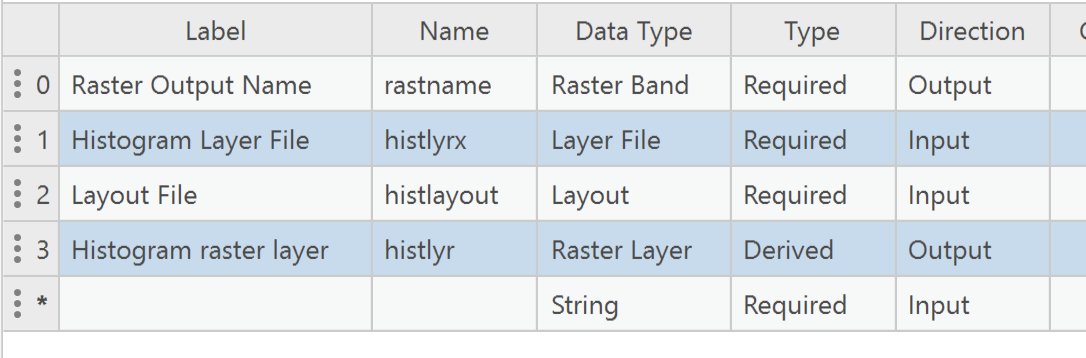
A clue - right after the line that invokes ApplySymbologyFromLayer, the code writes out the layer name. On first usage of the tool, this writes something like 'GPLYR_{EC07329E-BF4A-872F-A9F0DC9DB737}'. On subsequent uses, this actually writes out the name that I specified in the UI, e.g. "demo1".
Thank you for any ideas.
Pete


