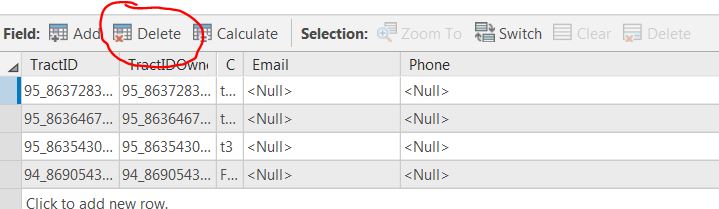
Is there a way to disable or remove the delete field option on the attribute table? I have had multiple people do this on accident and Pro does not give you an warning before it happens. I know you can customize the ribbons at the top but I can't find anything in for the attribute table customization. pro attributetable #arcgispro
No. And with the warning and the coding needed to make everything customizable, removable and enablable, I doubt you will see it.
The point needs to be drawn I suppose, to head off those... "...I removed the Delete icon... how do I get it back..? " questions that it would raise
You can only cater to people's actions for so long....
perhaps you can distribute this to those that persist on deleting fields 'accidently' more than once.
Somehow they are "accidentally" deleting these fields. It will have to be reiterated.
Jessica...
if the circled icon (and others within the table) is the one they are clicking on... the warning pops up...
I am assuming you are using a current version of PRO.
If you have seen such behaviour, then you could report first a first hand experience, and it would lend some credence to the claim.
However, as with many errors of a 'just happened' nature, further inspection usually reveals that the user clicked a button on a dialog (like the one I posted) hoping the things will be better... ( I teach and this at least has been my observation )
Try as I could, I was unable to replicate an unintentional field deletion that didn't provide an error warning.
But as of now there is no way to remove that button all together?
Signed in members can post, follow updates, and more. New here? Register a free account.
Find useful guides, FAQs, and documents to help you navigate and make the most of Esri Community.