Evening all,
I'm currently working on a project where I need to symbolize a footpath polyline based off of two values,
The first value is used to set the symbol type using unique values i.e. paved, sealed, concrete etc
The second value is used to set the colour based off of footpath condition values ranging from 0-5 with specific breaks according to certain condition values i.e 0-0.99, 1-1.99....,
So far I have been able to achieve this within ArcGIS Pro using attribute driven symbology based off of this post: https://community.esri.com/t5/commercial-blog/color-me-impressed-with-attribute-driven-symbology/ba-p/884355
Which was great however this does not come across to ArcGIS Online when publishing this as a feature layer, I have found a few posts referencing how to do this with text in a pop-up using something similar to below:
var cd = $feature.condition
if (cd >= 0 && cd <= 0.99){return "#38A800"}
if (cd >= 1 && cd <= 1.99){return "#7ACB00"}
if (cd >= 2 && cd <= 2.99){return "#CEEE00"}
if (cd >= 3 && cd <= 3.99){return "#FFFF73"}
if (cd >= 4 && cd <= 4.99){return "#FF6600"}
if (cd == 5){return "#FF0000"}
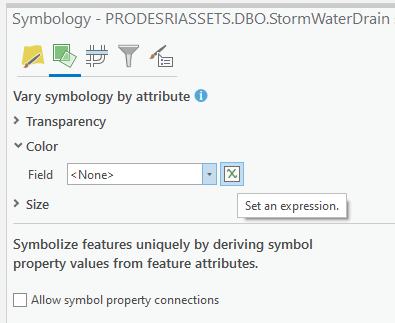
but this does not seem to work when I try to set this within ArcGIS Online or ArcGIS Pro when using "Vary Symbology by attribute" and setting the expression to change the symbol colour :
I've also tried using the when() function but could not get that to work either
Is it possible to set symbol type and using arcade to set polyline colour based off of specific integer values?




