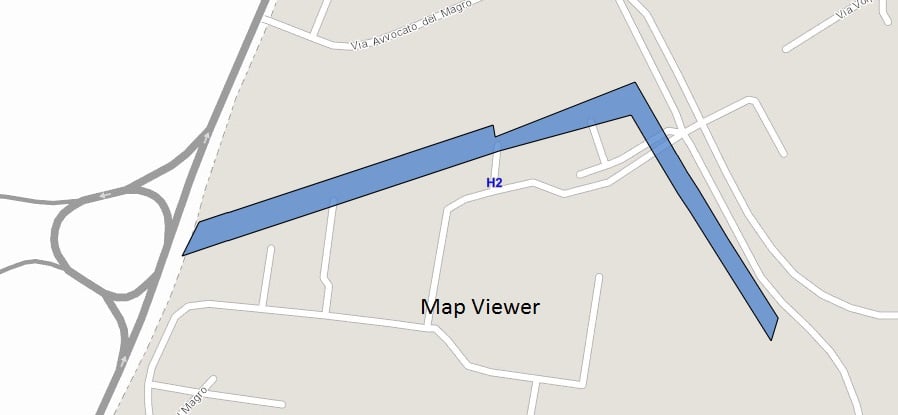
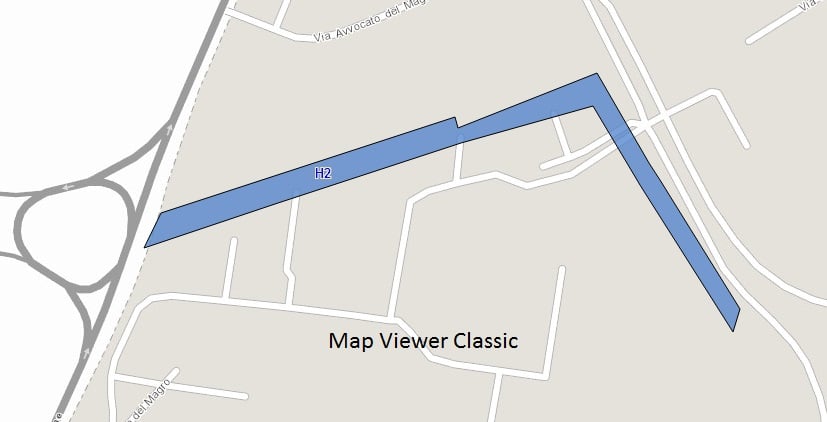
I found that in the Map Viewer the labels of some polygons are not positioned correctly, in fact they are outside the polygon. Instead, if we use the Map Viewer Classic the labels are positioned correctly.
I attach the zip relating to the polygonal shp that have this problem.Has anyone else encountered this? Does anyone have any suggestions?Thank you.
This is a known limitation in 4.x JSAPI. Its planned to support centroid position early next year.
Not on the immediate schedule but not ruling it out.
The labeling looks much better.
Are there further improvements planned for labeling of multipart polygons? It sure would be nice for the yellow polygon below to contain a label.
Please see webapp classic for an example of how the labels might be visualized.
The centroid labeling update went out with the update of the October 2023 release.
I think we will have something rolling out for this fall release. If you have a sample map you'd like to share I can check it out against what we are working on.
Russ is there any movement on resolving this issue?
thanks for posting, checking it out. These are multipart polygons?
Hi @RussRoberts,
I turned off labeling for the map. I can share the underlying public rest service, to help with your testing. https://webmaps.sandiego.gov/arcgis/rest/services/DSD/Zoning_Overlay/MapServer/2
Line labeling can be configured for repeat. To configure this click on Label Styling option and you will see: turn on the Repeat label toggle button and set a Label repeat interval value.
Follow up on the question. Does the label only appear once per feature, regardless of zoom extent? Is that why I only see one label below?
So, a polyline of the Nile River, would only be labeled once in the centroid of the river?
It will probably roll out this fall update to all apps using the latest builds of the API.
Awesome to hear your working on the issue, do you know when a solution will be released? Hopefully with the next AGO update.
The map is not yet public, the desire would have been to release with the Sidebar instant app to keep a consistent theme, however based on the labels outside of the polygons this likely be webapp classic.
Thank you
We are working on the centroid labeling. If you can share the web map I can compare the results.
Having the same issue.
Map Viewer, only a single feature N-APP-2 labeled, appears outside of polygon. Why are none of the other features labeled?
Map viewer classic, more features labeled, labels are on the polygon they represent
Dear Russell, I have to develop a WebGIS service by the end of May. I wanted to ask if by that date the problem related to the positioning of the labels inside the polygon will be solved. let me know, if the problem is not resolved by the end of May I have to use Web AppBuilder instead of the Experience Builder. I ask you for a further courtesy as soon as the problem is solved you can let me know either here or directly to my email: fabianir@hotmail.comThank you,Best regards
Rodolfo
Thanks for the reply, you don't have an indication when this issue will be fixed.Thank you,Best regards.
There is still an API limitation on the label placement at the centroid of the polygon vs. inside. This will be seen across Map Viewer and Experience Builder.
Dear Russell, i wanted to ask you when the problem in Map Viewer related to the positioning of the labels inside the polygon will be solved. I need to plan the delivery of a project with Experience Builder where some polygons have this problem with the labels. Thank you, a cordial greeting.Rodolfo
Thanks for the reply, we hope that the change will take place as soon as possible. Thanks again, I take this opportunity to wish the whole community a happy and peaceful Christmas, a splendid 2023.
Signed in members can post, follow updates, and more. New here? Register a free account.
Find useful guides, FAQs, and documents to help you navigate and make the most of Esri Community.