Hi all,
I am working on ArcGIS Enterprise 10.9.1, ArcGIS Workflow Manager Server 10.9.1, and ArcGIS Pro 3.0. I have created a workflow for a branch versioning data editing work with reconcile and post at the end of the job.
I have configured the 'Reconcile Versions' geoprocessing tool to run in the workflow step, where if the reconcile and post is successful, the workflow would remain with the same user and move to another geoprocessing tool step (in workflow image, it is the step named 'Alter Version'). If the reconcile and post is unsuccessful (i.e., due to conflict between branch versions), the workflow would be routed to the editor user to manage the conflicts (in workflow image, it is the step named 'Perform Edits').
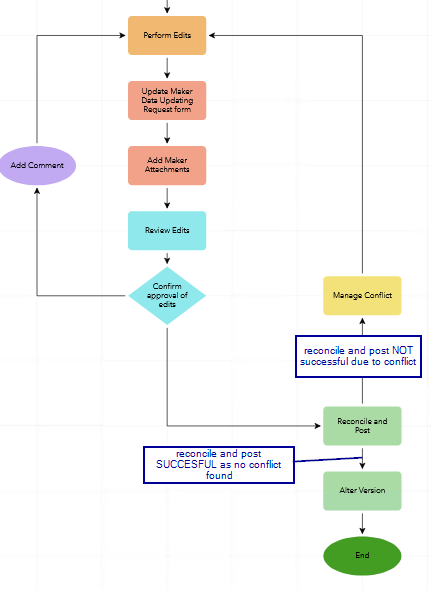
I ran a few test cases to see if the reconcile and post step would be routed to another user due to conflicts in the branch versions, but it is not working as intended as the workflow step seems to treat the step as having ran successfully so it moves to the 'Alter Version' step instead of being routed to the editor user ('Perform edits' step). I can visually see that the reconcile and post step did not reconcile the versions as the feature I edited in sde.DEFAULT did not change to reflect the edits made in the branch versions.
Something I noticed is that when I ran the 'Reconcile Versions' geoprocessing tool outside of the workflow, if a conflict was found between the versions of sde.DEFAULT workspace, the message that gets generated by the tool is a 'Warning' error message (see screenshot).
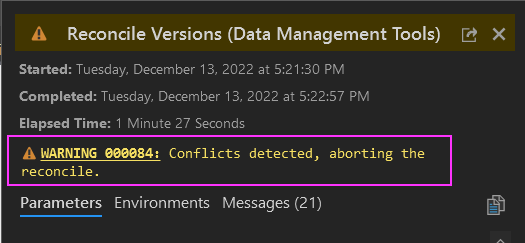
How should I configure the workflow path logic to read that when the tool throws out this warning message, it should be treated as a step failure and route back to the editor user?
Thanks


