Hi,
The search widget located in \client\dist\widgets\common\search has the following shortcomings:
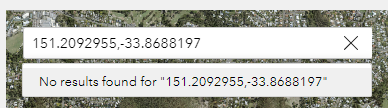
1. If no geolocator is selected (delete all 3 default Locator sources and add your own Layer source), then the "use current location" functionality fails, in the recent searches Listbox; It simply puts the latitude/longitude in the search box and nothing happens.
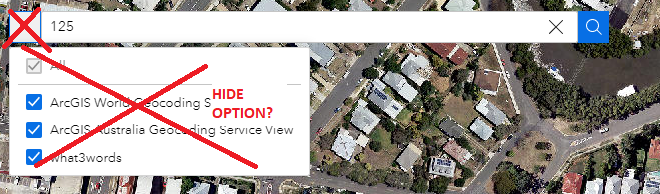
2. I would like the option to disable (hide) that pull down list on the left of the search box
(hide the little menu that filters by search-source)
3. Ability to adjust the height of the search box widget (not respected at the moment in the Style panel).
4. Ability to change the font and font-color of the Search widget (in the style panel) -- why didn't they do that instead of "rotation" and "animation" features:)
5. The Search widget has a permanent gray border 1px no matter what, if you change the border setting then it adds another border around the immutable gray one.
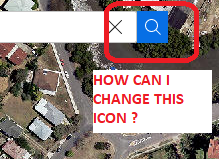
6. Ability to edit the search icon / colors on the far right side of the search box (or completely remove it, since no one actually needs to click on this. End-users click on the suggestion list only)
7. If the suggestion list is only one item, why does it pull down the suggestion list and ask me to click on the _one_ choice? Can't it just perform the search immediately?
8. Another issue: bringing the blinking cursor back into the search widget box causes some odd behaviour (not going "in focus", where the blinking cursor does not want to "stick" where we want it to be). * Drop a search widget on your ExB, leave the default options, run the map, search for an address then click the blue search button, then try to click on the text box again to enter another address: see? the blinking cursor doesn't stay in there, and I cannot type anything anymore, unless I clear everything with the "x" on the right side of the search box. Very odd behaviour.
9. After I pick one entry in the suggestion list, why does it popup the "search result" list with my (one) selection in it? Why not skip this double-window-double-clicking step and perform the search immediately? This is very confusing for end-users.
10. Once a search has been performed and the map is zooming to the correct location, please clear the search box and all its dropdowns 🙂
11. You search widget action "zoom to" with automatic zoom scale isn't working properly, It sometimes goes out by default to the full extent of the map instead of zooming in on whatever selected feature I searched for. Also I would add a % buffer threshold to your automatic zoom-to ( I mean : zoom to the found feature and guarantee 20% space all around, as an optional parameter )
I understand that the search widget you provide has to be generic enough to suit everyone, while remaining simple to configure. (I know it's not easy to please everyone 🙂 )
Thank you


