To be fair, I don't know if this actually qualifies as a 'nested cursor' but it is a cursor calling up a function which has a cursor in it.
For starters, here is my function: it simply assigns a new identifier based on the points spatial location:
def SpatialRenumberPoints(InLayer, StartNumber):
    arcpy.management.AddXY(InLayer)##Could verify if exists first##
    arcpy.AddField_management(InLayer, "NewID", 'LONG')##Could verify if exists first##
    fields = ['OID@','POINT_X','POINT_Y','NewID']
    sqlOrder = "ORDER BY {0} DESC, {1} ASC".format(fields[2], fields[1])
    with arcpy.da.UpdateCursor(InLayer, fields,sql_clause = (None, sqlOrder)) as cursor:
        for row in cursor:
            row[3]= StartNumber
            StartNumber = StartNumber + 1
            cursor.updateRow(row)
    del cursor, row
When calling this function up in the Python Window, the next time it was run, the function would continue where it's last highest value left off. This was fixed by deleting out the cursor at the end of the function. Life is/was good.
Now, I realized I had a use case where I wanted to run the same tool against a dataset which has groups of points (identified by an attribute) and iterate through each group. No problem I thought, I'll just use use 'GROUP BY' for the SQL Clause in a search cursor. Like so:
with arcpy.da.SearchCursor('PlotCopy',['CLUSTER_ID'],sql_clause=(None, "GROUP BY CLUSTER_ID")) as cur:
    for row in cur:
        SpatialRenumberPoints('PlotCopy',1)
        print(row)
The only problem is that here again, the cursor isn't resetting or starting from '1' for each iteration.
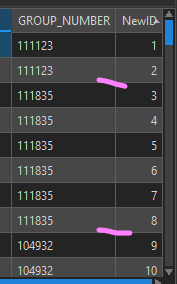
Perhaps I'm using GROUP BY inappropriately and should use my search cursor to setup a selection instead?
Thanks to anyone who can help!!



