I am working with custom tools in a Python Toolbox inside an ArcGIS Notebook. When a user provides either no parameters or the wrong parameters for a tool, I would like to display my own docstring; the same one that would be displayed in the terminal if the tool was being called from the command line (I import my tool from an external script file), INSTEAD of the ExecuteError messages that get displayed. I have worked out a process to get my docstring printed, and that does, at least, appear above the ExecuteError message block, but I can't get rid of the other messages.
True, I want this mostly for aesthetic reasons, but also, the line numbers listed in the traceback are confusing because they don't all actually indicate the lines of code in my script that are throwing the error.
Right now, I can display the docstring if I check for valid parameters in def updateMessages, but def execute still gets called. So, one solution would be if I could jump out of the python toolbox code before def execute is run. The other thing might be somehow removing the ExecuteError messages from the messages object ?
My Notebook cells, when no parameters are provided, look like this:
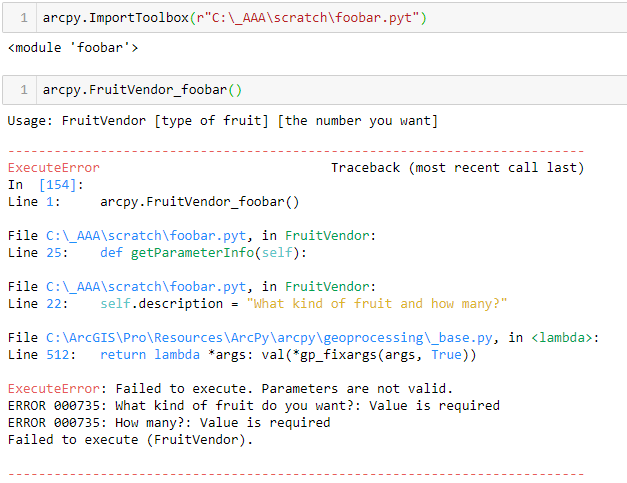
You can see my docstring, starting with "Usage:", is then followed by the ugly and less readable ExecuteError message block.
And the relevant part of the .pyt looks like this:
    def updateMessages(self, parameters):
        """Modify the messages created by internal validation for each tool
        parameter.  This method is called after internal validation."""
        parameter_values = [parameter.valueAsText for parameter in parameters]
        if parameters[0].valueAsText is None:
            import tool1
            importlib.reload(tool1)
            print(tool1.main.__doc__)
        return

    def execute(self, parameters, messages):
        """The source code of the tool."""
        import tool1
        importlib.reload(tool1)

        parameter_values = [parameter.valueAsText for parameter in parameters]
        if parameter_values[0] == 'broccoli':
            print(tool1.main.__doc__)
        else:
            tool1.main(parameter_values)
        return
Also, I need a solution that doesn't bork the functionality of the tool when opened in the Geoprocessing pane, that is, with the parameter form. For instance, I could make all of my parameters optional, which would pass internal validation and then allow me to do my own validation inside def execute (my if statement near the bottom of my code is an example of how this might be done), but that messes with the functionality of the form.

