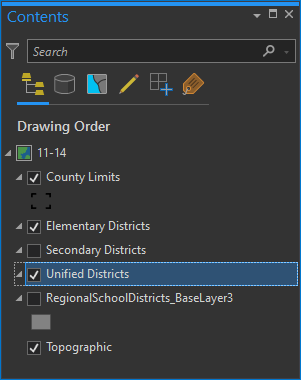
Using the below script, I'm not able to change a layers symbology if it is already set. For example, I have three layers with 4 break values and labels each. The intention of the script is to change a break value and label. If I run the script on the layers as they exist currently, the script runs successfully, but the changes aren't made and I get an error of sorts in the Symbology pane.
Three graduated colors layers before running script.
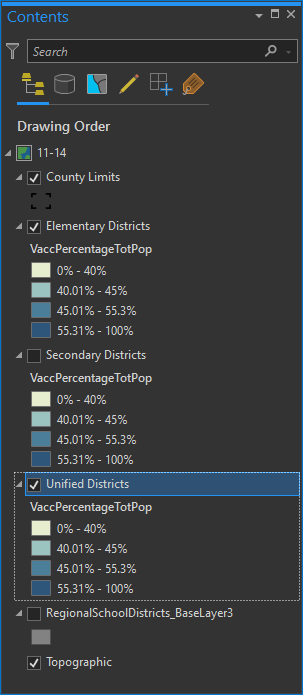
I change a break value from 55.3 to 56.3, and it's corresponding label. Then I run the script.
import arcpy, os, sys
# Reference a project, map, and layer using arcpy.mp
p = arcpy.mp.ArcGISProject('current')
m = p.listMaps()[0]
lyr = m.listLayers()

for l in lyr[1:4]:
    sym = l.symbology
    if hasattr(sym, 'renderer'):
        if sym.renderer.type == 'GraduatedColorsRenderer':
            sym.renderer.classificationField = 'VaccPercentageTotPop'
            print(f'changing layer symbology for {l}')

            #enter class break values
            classBreakValues = [40, 45, 56.3, 100]
            classBreakLabels = ["0% - 40%", "40.01% - 45%", "45.01% - 56.3%", "55.31% - 100%"]

            # Run the renderer.breakCount function to use the classBreakValues array parameters as the values, and create a counter.
            sym.renderer.breakCount = len(classBreakValues)
            count = 0

            #Create a loop to set the renderer
        for brk in sym.renderer.classBreaks:
            brk.upperBound = classBreakValues[count]
            brk.label = classBreakLabels[count]
            count +=1

        l.symbology = sym
p.save()

###prints:
### changing layer symbology for Elementary Districts
### changing layer symbology for Secondary Districts
### changing layer symbology for Unified Districts
The following is what happens. I get a warning in the Symbology pane (which doesn't tell me much).
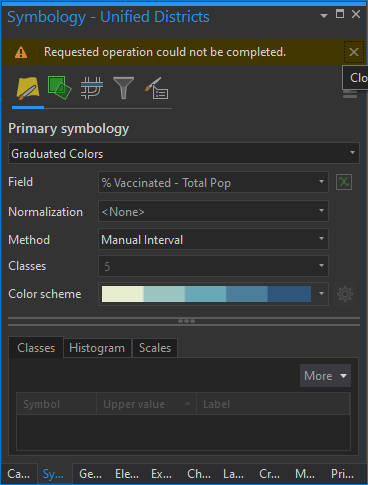
And my layers no longer have values.