Hi, I've been trying to teach myself the workflow of using the deep learning tools in ArcPro 2.8. I have installed the deep learning libraries for 2.8 as instructed on the GitHub site here. My set up is ArcPro 2.8.1 and my PC is a modern i7, 32gb computer with an nvidia 3070 RTX graphics cards.
I decided the best way to learn was to replicate a task I had done recently but using the deep learning tools. I have a Sentinel 2 image and I want deep learning to identify bare/ploughed fields in a small area of the UK. Originally I thought this was object detection and followed the workflows described in the ArcPro help file. ArcPro was crashing and reporting errors so I almost gave up. But having read this page I realised object detection was about putting those rectangles around what it thinks it has found. I want the actual boundary of the field identified and have realised it is pixel classification I need to be doing.
Either the process inconsistently fails with an error (something about a bad token) or it simply creates a blank raster when I run the Classify pixels using Deep learning tool. I typically accept all the default settings as I don't know any better! I find setting the tools to use a GPU runs longer\errors\crashes than if I set it to CPU. This thread hints to the fact that these deep learning libraries are not compatible with an RTX 3070 GPU?
So let me talk you through my steps, may be you will spot the many "school boy errors" I am making? I'm a complete novice to this branch of image analysis and fully accept I'm doing something daft!
- I have read the thread here and have as a first step converted the 16 bit Sentinel 2 image to a 3 band 8 bit unsigned raster.
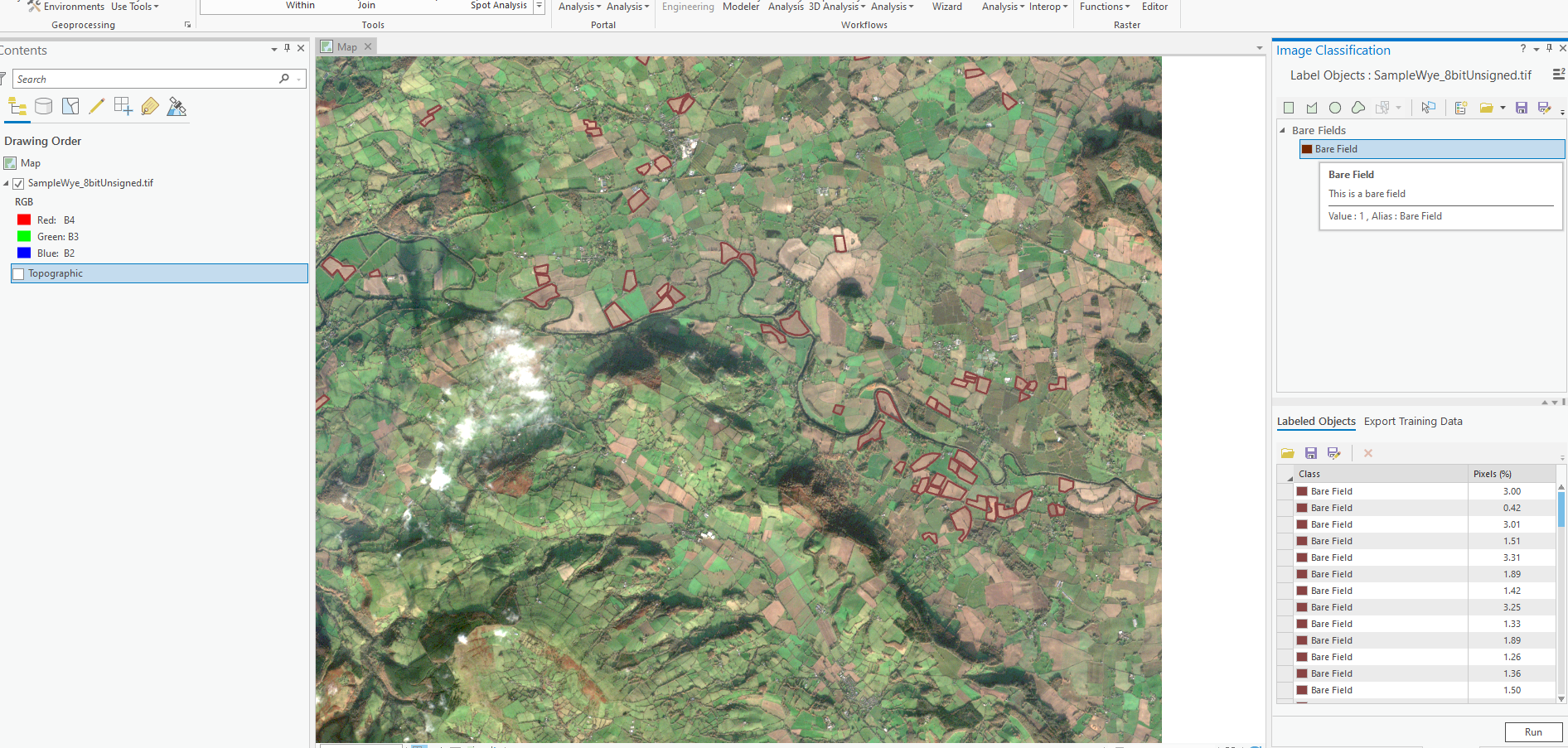
- I select the raster in the TOC, and use the labels objects for deep learning to draw around 70 polygons, as you can see they have a class value of 1. I only draw polygons around what I think are bare fields. Is this too little or inappropriate for pixel classification?
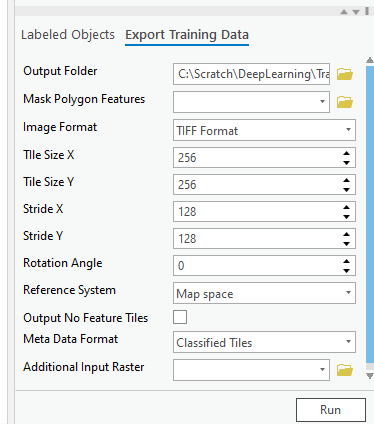
- I export the training data as TIFF and set the metadata to Classified Tiles as shown below. This tool runs fine. The classified tiles allows me to select the U-Net classifier in the next processing step.
I run the train deep learning tool with the environment settings set to CPU and 100% parallel processing. The main dialog interface is left as is:
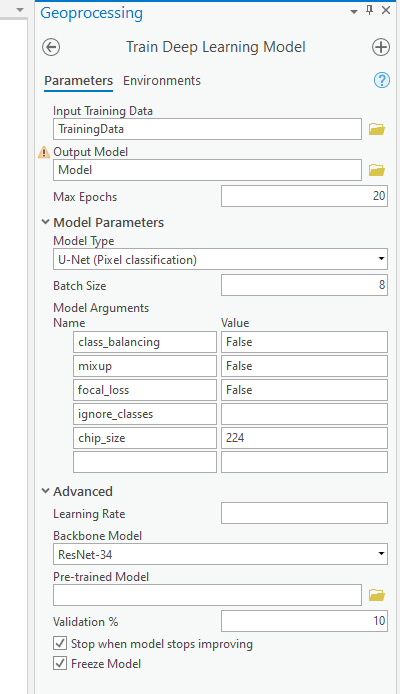
- With regards to the Model Arguments, we see 5 arguments have been supplied as a default for U-Net but when I look at the Help in arcgis.learn module chip_size is not an argument, in fact its not mentioned anywhere on that page for the UnetClassifier. I have come to the conclusion that arguments it offers up are not always appropriate, seems like a tool interface bug, am I correct?
The message dialog reports this (I will be honest, this is all meaningless to me as I don't yet fully understand all the nuisances of the tool). But I'm OK with that as I am just trying to learn and get anything out of it!
Start Time: 21 July 2021 12:12:34
Learning Rate - slice(5.754399373371565e-05, 0.0005754399373371565, None)
epoch training loss validation loss accuracy Dice
0 0.08495312929153442 0.12163998186588287 0.9776098132133484 0.0
1 0.051144104450941086 0.10854105651378632 0.9776098132133484 0.0
2 0.03989902138710022 0.0694444552063942 0.9776037931442261 0.0
3 0.03854808583855629 0.06977503001689911 0.9776098132133484 0.0
4 0.04184050112962723 0.0712885931134224 0.977604866027832 0.0
5 0.03452085331082344 0.06181521341204643 0.9776098132133484 0.0
6 0.035225775092840195 0.06532987207174301 0.9776098132133484 0.0
7 0.03405182063579559 0.061748944222927094 0.9776098132133484 0.0
8 0.0513390377163887 0.07498864829540253 0.9776098132133484 0.0
9 0.03635616600513458 0.06778693199157715 0.9776098132133484 0.0
10 0.035765890032052994 0.05881249159574509 0.9776098132133484 0.0
11 0.03397132828831673 0.059320658445358276 0.9776098132133484 0.0
12 0.04003984481096268 0.06356815993785858 0.9776098132133484 0.0
13 0.03734290599822998 0.06060848757624626 0.9776098132133484 0.0
14 0.033427681773900986 0.05860653519630432 0.9776098132133484 0.0
15 0.03398134186863899 0.0582389235496521 0.9776098132133484 0.0
16 0.03260520100593567 0.05759035423398018 0.9776098132133484 0.0
17 0.033332113176584244 0.05730770155787468 0.9776098132133484 0.0
18 0.03224635496735573 0.05699590593576431 0.9776098132133484 0.0
19 0.032304972410202026 0.05687981843948364 0.9776098132133484 0.0
{'accuracy': '9.7761e-01'}
NoData Bare Field
precision 0.977610 0.0
recall 1.000000 0.0
f1 0.988678 0.0
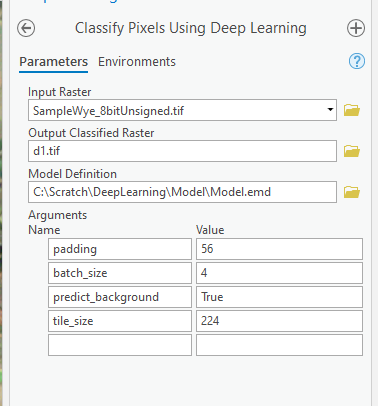
Succeeded at 21 July 2021 12:59:56 (Elapsed Time: 47 minutes 21 seconds)- I finally run the Classify Pixels using deep learning tool, I set to use CPU and I limit the extent of processing, the tool is set up as:
- The output is a blank raster:
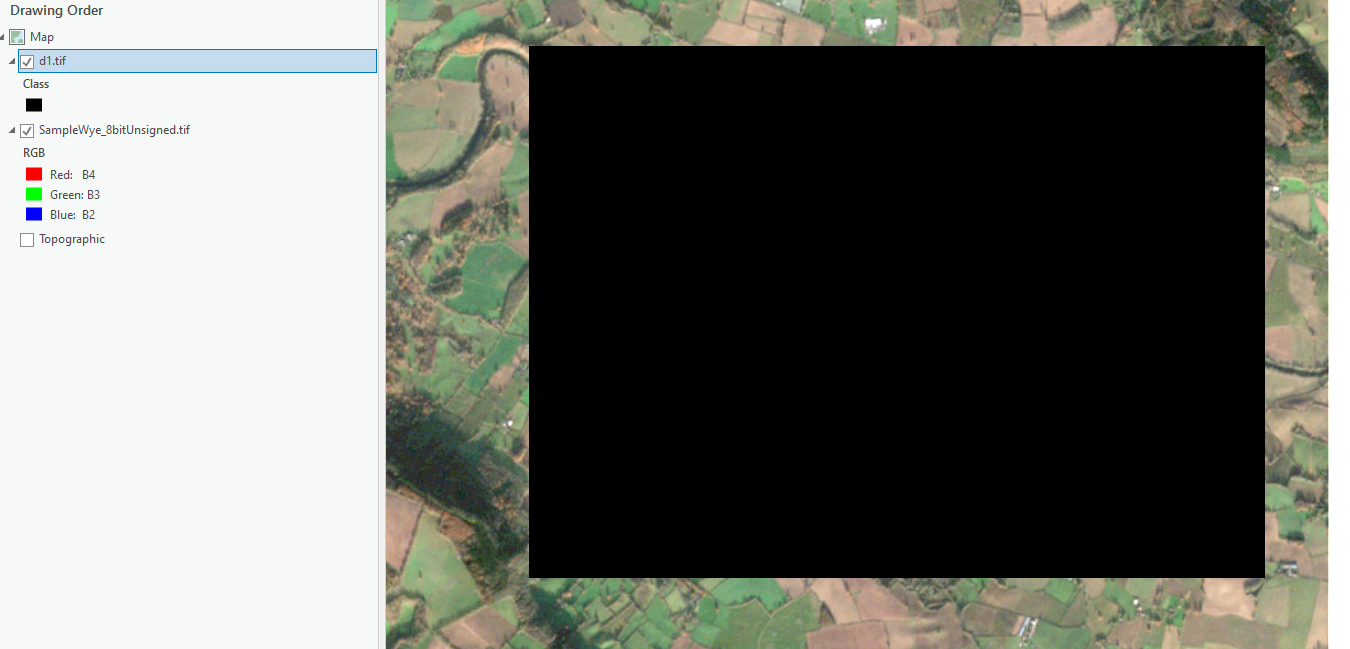
So I think I'm doing the right sequence Prepare raster> create training samples > export > train > detect and I think I'm using the correct type of classification (pixel classification not object detection) but as you can see nothing works!
If anyone has any advice I am desperate to hear from you, even if I have done a dumb thing that any hardened deep learner would intuitively know.







