So this is following on a little from this question:
Edit Widget maybe broken in new Web Apps?
Which I thought I had solved, but am now having more issues with.
I have a web app that has a single editable layer in it.
1. I open the app, open the editing widget, click on a point - the point is editable
2. If I search for an address, the map will zoom to it but then I can't click on any points to access the Edit window - even after clearing the geocoder search bar. All points come up with the result from the geocode:
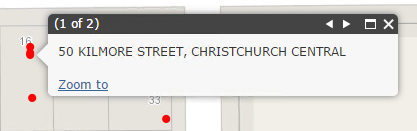
I searched for 50 Kilmore and then cleared the Search Bar. All points now return this popup.
3, The workaround I've found is to exit and re-enter the edit widget, at which point the points become editable again.
Does anyone else have this problem or, better yet, a solution?
Jianxia Song, this might be one for you... 
Thanks!



