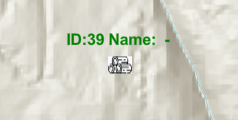
I have a simple map that loads points as Graphics onto a FeatureLayer using a source collection. I want to access the attributes of the graphics to use in the popup and point label but I just can't get it to work.
In the code snip below, I populate the collection (esri/core/Collection), define a labelClass and add the layer to a map. The sourceSymbol is a PictureMarkerSymbol. You can see that each point in the collection has 3 attributes. I set the DESCRIPTION attribute as static text: "DESCRIPTION" so as to ensure that it has a value.
What I see is that the label properly contains the ObjectID, but the NAME and DESCRIPTION are not populated in the label expression.
Here's the code. I'd really appreciate it if someone could point out my mistake. Thanks.
var collection = new Collection();
for (var i = 0; i < features.length; i++) {
var data = features[i];
if (data.Type == "Feature") {
featureGeometry = data.Geometry
featureProperties = data.Properties
if (featureGeometry.Type == "Point") {
const point = {}
point.type = "point";
point.longitude = featureGeometry.Coordinates.Longitude;
point.latitude = featureGeometry.Coordinates.Latitude;
var pointGraphic = new Graphic({
geometry: point,
symbol: ticketSymbol,
attributes: {
ObjectID: i,
NAME: featureProperties.Name,
DESCRIPTION: "LABEL DESCRIPTION"
}
});
collection.add(pointGraphic);
}
}
}
const labelClass = {
// autocasts as new LabelClass()
symbol: {
type: "text",
color: "green",
font: {
family: "Arial Unicode MS",
size: 12,
weight: "bold"
}
},
labelPlacement: "above-center",
labelExpressionInfo: {
expression: "'ID:' + $feature.ObjectID + ' Name: ' + $feature.NAME + ' - ' + $feature.DESCRIPTION "
}
};
sourceLayer = new FeatureLayer({
title: "Sources",
outfields: ["*"],
source: collection,
objectIdField: "ObjectID",
labelingInfo: [labelClass],
renderer: { type: "simple", symbol: sourceSymbol }
});
map.layers.add(sourceLayer);