ArcGIS Pro 2.7
I have an aprx that I use often and it has a feature template: it's the ESRI Address data management solution so the template/symbology for site address points looks like this:
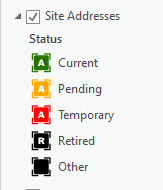
The data is housed in an Enterprise Geodatabase (aka SDE). I was working in a project file that initially was set up with the symbology shown above and I modified it for a map I needed to make. I thought I closed the project with out saving any changes.
However, now when I add that feature class to a new aprx, or even a map pane in an existing one the are symbolized with what I had used in that one project:
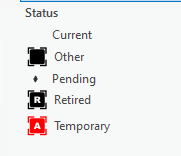
I don't understand where this is coming from. Prior to this little mishap, I could add the point feature classs to a new project and a default, single symbol would be automagically used. How do I get that to be the case once again?
Oh... Yes, I've tried shutting down Pro and have even shutdown the computer it's running on. I've also gone into Options / Display and Cleared the Local Cache.




