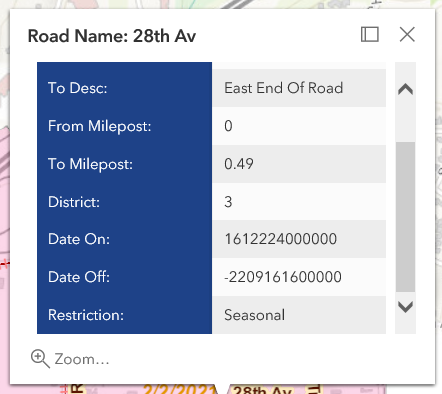
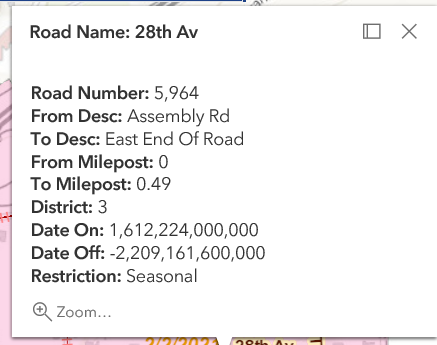
I am using ArcGIS API for JavaScript 4.13 and I cannot get the date formatted in my PopupTemplate. Attached are screenshots of what the popups look like when using date format and without. Here is the code:
  var tplRoadRestriction = {
                // autocasts as new PopupTemplate()
                title: "Road Name: {RoadName}",
                content:
                    "<br/><b>Road Number:</b>  {RoadNumber}" +
                    "<br/><b>From Desc:</b>  {FromDesc}" +
                    "<br/><b>To Desc:</b>  {ToDesc}" +
                    "<br/><b>From Milepost:</b>  {FromMP}" +
                    "<br/><b>To Milepost:</b>  {ToMP}" +
                    "<br/><b>District:</b>  {District}" +
                    "<br/><b>Date On:</b>  {DateOn}" +
                    "<br/><b>Date Off:</b>  {DateOff}" +
                    "<br/><b>Restriction:</b>  {Restriction}",
                autoCloseEnabled: true
}; 
 var tplRoadRestriction = new PopupTemplate({
                // autocasts as new PopupTemplate()
                title: "Road Name: {RoadName}",
                outFields: ["*"],
                content: [{
                    // It is also possible to set the fieldInfos outside of the content
                    // directly in the popupTemplate. If no fieldInfos is specifically set
                    // in the content, it defaults to whatever may be set within the popupTemplate.
                    type: "fields",
                    fieldInfos: [{
                        fieldName: "RoadNumber",
                        label: "Road Number"
                    }, {
                        fieldName: "FromDesc",
                        label: "From Desc:"
                    }, {
                        fieldName: "ToDesc",
                        label: "To Desc:"
                    }, {
                        fieldName: "FromMP",
                        label: "From Milepost:"
                    }, {
                        fieldName: "ToMP",
                        label: "To Milepost:"
                    }, {
                        fieldName: "District",
                        label: "District:"
                    }, {
                        fieldName: "DateOn",
                        label: "Date On:",
                        format: {
                            dateFormat: 'shortDateShortTime'
                        }
                    }, {
                        fieldName: "DateOff",
                        label: "Date Off:",
                        format: {
                            dateFormat: 'shortDateShortTime'
                            }
                        }, {
                            fieldName: "Restriction",
                            label: "Restriction:"
                    }]
                }]
            });