I am running into an error when running a script that tries to import arcpy, in PyCharm, using Pro rather than ArcMap, on a virtual server machine that my organization wants to use to store and run scripts in our enterprise environment. I am trying to get the server set up for this. I have used arcpy in Pycharm on my own PC just fine; I do not know what the problem is with it on the server. I have tried all kinds of possible fixes. Can anyone help?
I already uninstalled and reinstalled both Pro and PyCharm, and I have deleted tons of PyCharm projects and created new ones with different settings. I get the same error no matter what I try.
Pro version: 2.7
Python: 3.7
Here is the error:
C:\Program Files\ArcGIS\Pro\bin\Python\envs\arcgispro-py3\lib\site-packages\numpy\__init__.py:138: UserWarning: mkl-service package failed to import, therefore Intel(R) MKL initialization ensuring its correct out-of-the box operation under condition when Gnu OpenMP had already been loaded by Python process is not assured. Please install mkl-service package, see http://github.com/IntelPython/mkl-service
  from . import _distributor_init
Traceback (most recent call last):
  File "C:\Program Files\ArcGIS\Pro\bin\Python\envs\arcgispro-py3\lib\site-packages\numpy\core\__init__.py", line 22, in <module>
    from . import multiarray
  File "C:\Program Files\ArcGIS\Pro\bin\Python\envs\arcgispro-py3\lib\site-packages\numpy\core\multiarray.py", line 12, in <module>
    from . import overrides
  File "C:\Program Files\ArcGIS\Pro\bin\Python\envs\arcgispro-py3\lib\site-packages\numpy\core\overrides.py", line 7, in <module>
    from numpy.core._multiarray_umath import (
ImportError: DLL load failed: The specified module could not be found.

During handling of the above exception, another exception occurred:

Traceback (most recent call last):
  File "D:/Scripts/pythonProject/test2.py", line 3, in <module>
    import arcpy
  File "C:\Program Files\ArcGIS\Pro\Resources\ArcPy\arcpy\__init__.py", line 21, in <module>
    import numpy
  File "C:\Program Files\ArcGIS\Pro\bin\Python\envs\arcgispro-py3\lib\site-packages\numpy\__init__.py", line 140, in <module>
    from . import core
  File "C:\Program Files\ArcGIS\Pro\bin\Python\envs\arcgispro-py3\lib\site-packages\numpy\core\__init__.py", line 48, in <module>
    raise ImportError(msg)
ImportError:

IMPORTANT: PLEASE READ THIS FOR ADVICE ON HOW TO SOLVE THIS ISSUE!

Importing the numpy C-extensions failed. This error can happen for
many reasons, often due to issues with your setup or how NumPy was
installed.

We have compiled some common reasons and troubleshooting tips at:

    https://numpy.org/devdocs/user/troubleshooting-importerror.html

Please note and check the following:

  * The Python version is: Python3.7 from "D:\Scripts\pythonProject\Scripts\python.exe"
  * The NumPy version is: "1.19.1"

and make sure that they are the versions you expect.
Please carefully study the documentation linked above for further help.

Original error was: DLL load failed: The specified module could not be found.I've already clicked and Googled everything I have found or thought of, and I've read lots of stuff about Pro and PyCharm from Esri and on Geonet and Stack Exchange, etc. But none of the solutions work for me.
Here is my project interpreter setting (I have tried various other settings):
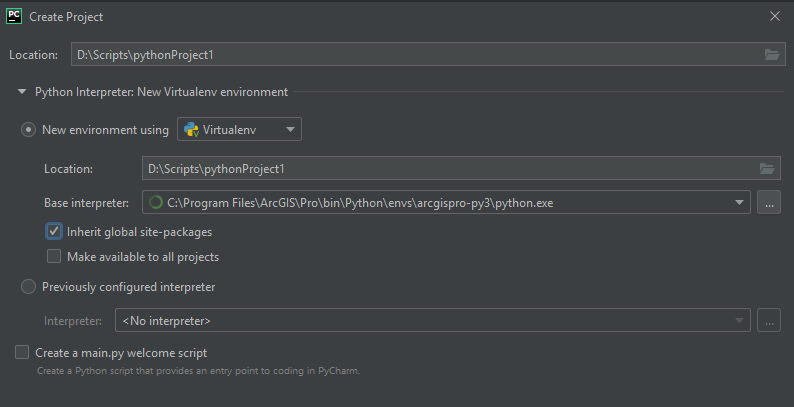
I did try making it a conda environment a couple times and pointing to a file within ArcGIS Pro that had conda in the name. Note that I do not know what conda is or how it may be relevant or not in this situation.
Here is my sys.path:
D:\Scripts\pythonProject\Scripts\python.exe D:/Scripts/pythonProject/test2.py
D:\Scripts\pythonProject
C:\Program Files\ArcGIS\Pro\Resources\ArcPy
D:\Scripts\pythonProject
C:\Program Files\ArcGIS\Pro\bin\Python\envs\arcgispro-py3\python37.zip
C:\Program Files\ArcGIS\Pro\bin\Python\envs\arcgispro-py3\DLLs
C:\Program Files\ArcGIS\Pro\bin\Python\envs\arcgispro-py3\lib
C:\Program Files\ArcGIS\Pro\bin\Python\envs\arcgispro-py3
D:\Scripts\pythonProject\lib\site-packages
C:\Program Files\ArcGIS\Pro\bin\Python\envs\arcgispro-py3\lib\site-packages
C:\Program Files\ArcGIS\Pro\bin
C:\Program Files\ArcGIS\Pro\Resources\ArcToolbox\Scripts
C:\Program Files\ArcGIS\Pro\bin\Python\envs\arcgispro-py3\lib\site-packages\future-0.18.2-py3.7.egg
C:\Program Files\ArcGIS\Pro\bin\Python\envs\arcgispro-py3\lib\site-packages\pytz-2020.1-py3.7.egg
C:\Program Files\ArcGIS\Pro\bin\Python\envs\arcgispro-py3\lib\site-packages\pywin32_ctypes-0.2.0-py3.7.egg
C:\Program Files\ArcGIS\Pro\bin\Python\envs\arcgispro-py3\lib\site-packages\pywin32security
C:\Program Files\ArcGIS\Pro\bin\Python\envs\arcgispro-py3\lib\site-packages\sympy-1.5.1-py3.7.egg
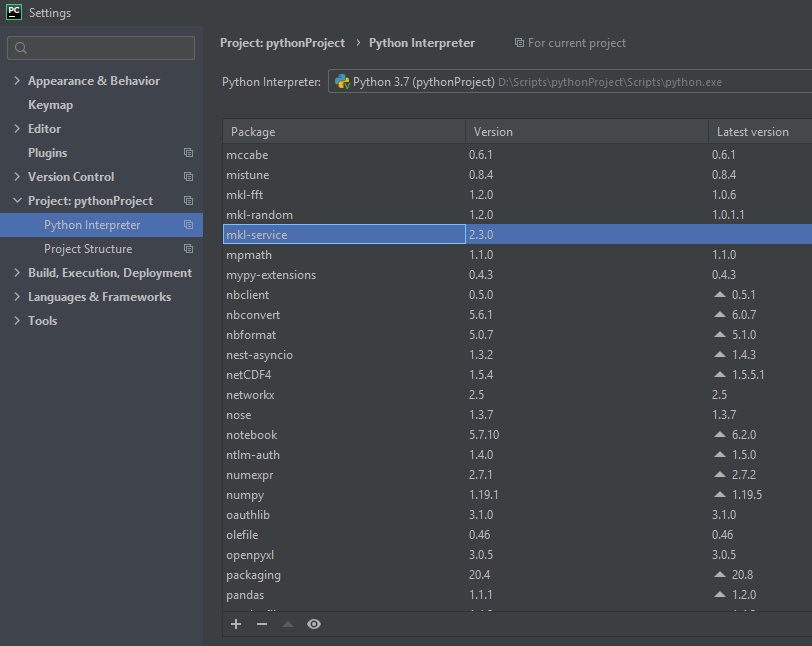
The error has something to do with numpy, and with mkl-service, but I have both of those:
Any help would be much appreciated, because I am 100% stuck now, after banging my head against the wall with this for several days. Thank you!!



