Hi Again,
I am still working through the second ETL training (for older versions of Desktop) in ArcGIS Pro. Know that there are differences, but these are the only spatial data ETL trainings i know of.
working with Pro 2.6.3 and FME 2020.0.1.0 (20200407 - Build 20218 - WIN64)
Training: Controlling Data Translations Using Extract, Transform, and Load Processes | Esri Training Web Course
Ultimately, I need to use the "Fanout" function of the Writer Feature Type.
I have two Reader Feature Types feeding a PointOnAreaOverlayer, with its point output attached to a Point Shapefile Writer Feature Type. The first problem was figuring out how to duplicate the training's magical interconnection between all of the accumulated attributes listed in the PointOnAreaOverlayer and the Writer. I followed the instructions, but after using "Copy Attributes from Transformer", the "Name" attribute in the Writer had a red node and would not get data from the Overlayer when run. ("NAME" is the field in a polygon layer that must be captured in the point output.) I found the Overlayer's Attribute Accumulation - Merge Attributes and set the Accumulation Mode to "Merge Incoming". That allowed the Overlayer to show the polygon "NAME" attribute in the point attribute output list, and be visible to the point Writer. In previous versions of FME, this didn't have to be done? - Or more functionality forced additional layers of configuration?
Now on to the real part of the question...
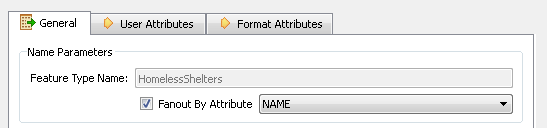
I need to do a "Feature type fanout." Here is the Training pic of the simple checkbox and category picker within the Writer Feature Type Properties:
Here is the Writer Feature Type Properties that I see in Pro/FME:
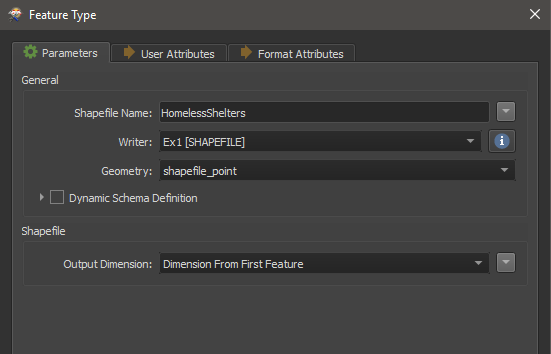
Where is the Feature type Fanout functionality?
Thanks,
-_Adam