I've encountered an odd bug when performing spatial joins against a hosted feature layer of polygons. I'm doing a spatial join of a local shapefile of points to a hosted feature layer of polygons inside of ArcPro to basically tag each point with the city it's in. I've done this before and didn't notice any issues but this time all the highlighted points were treated as if they weren't inside a polygon even though all except 1 is.
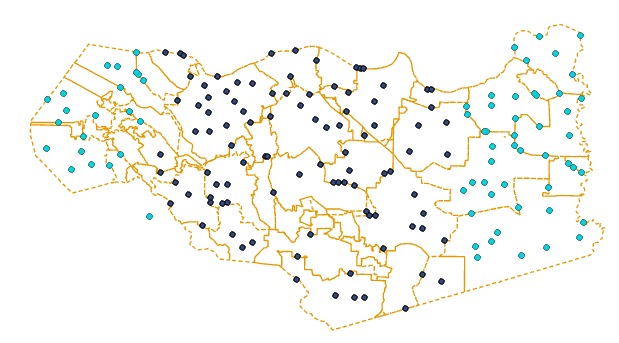
It seems like it's sharp rectangle cut off so it reminds me of how tiled areas are retrieved from web services. This is random test data so it's not clear but I had points inside the same polygon both joined and not joined so it's not an object retrieval issue, it seems to be spatial based on the bounding rectangle. I can export the web layer to a local file and it works fine but I'm still curious if anyone might have an explanation or fix for this issue when working directly with the web layer. I've tried it both added to ArcPro via Add Data or via the .pitemx file from the Portal interface and have the same error.
Edit:
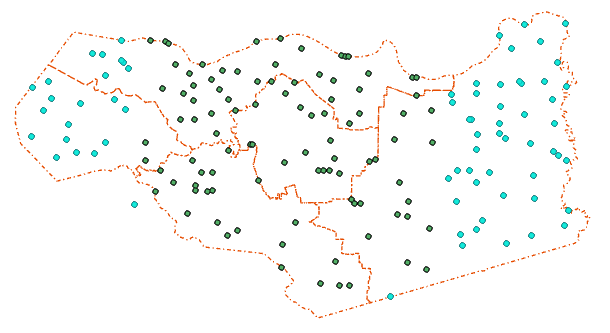
Another example with a different hosted layer with larger polygons which shows the test data both joining and not joining inside the same polygon.
Edit2:
Other things I've tried, using way larger extents than default in the Environments section of the geo processing tool. Also, since the join I was doing was part of an arcpy script I tried the standard Spatial Join from the right click-context menu in Arc Pro and received the same results. It feels like Arc Pro is capable of grabbing stuff from an ArcGIS server hosted feature layer just fine for display but when it's retrieving geometry information for spatial joins it can only return info for a handful of tiles or a limited extent.
I've encountered this with several different polygon layers as well as layers on a staging server running on 10.9 instead of the 10.8 I was previously testing on. I also tried a spatial join with a small selection of polygons and have the same issue where it treats everything beyond this rectangle as if it wasn't there.

