What I'm Trying To Do:
To begin, I am very, VERY, new to Python and can't wrap my head around scripting. So I need all the help I can get. Bear with me, please.
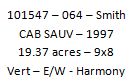
I am intending to use four fields as a stacked label for each polygon in the shapefile. I want them to look like this:
What I have:
So far I have two of the four fields prepared. I wanted to make sure that I could successfully stack at least two fields before going on and finalizing the other two. Wouldn't want to do all that work just to be told I have to redo it. So in the example, I will provide the two attribute fields that I have.
CV_Ranches_Table_ArcGIS.txt.First
CV_Ranches_Table_ArcGIS.txt.Second
First representing what I want for the first line, second representing the second.
I am aware that this discussion title is only reworded a bit in the ArcGIS Help 10.2 seen here: ArcGIS Help (10.2, 10.2.1, and 10.2.2)
"Create stacked text. For example, this expression creates a label with the Name field and the two address fields all on separate lines:
"Name: " + [NAME] + '\n' + [ADDRESS_1] + '\n' + [ADDRESS_2]"
This is what I'm exactly looking for! To stack multiple attribute fields into one label. In Label Expression, I attempted to copy and paste this code into my expression dialogue window. With my code looking like:
def FindLabel ( [CV_Ranches_Table_ArcGIS.txt.First], [CV_Ranches_Table_ArcGIS.txt.Second] 😞
return [CV_Ranches_Table_ArcGIS.txt.First] [CV_Ranches_Table_ArcGIS.txt.Second]
"Name: " + [CV_Ranches_Table_ArcGIS.txt.First] + '\n' + [CV_Ranches_Table_ArcGIS.txt.Second]
After selecting the first and second attribute fields, it automatically added the "def FindLabel" code so I kept it thinking this was standard beginning for all codes...
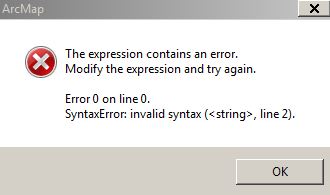
But I receive an error message each time.
What I'm Receiving:
In the words of a very, most surely, well-known Beatles' song... "HELP. I need somebody."
Also....
Is there are a way to make multiple, individual fields on the same line? (If I decide to create different excel cells for the remainder of attributes I have yet to create. This would make it faster, I think. As far as inputting them in the spread sheet, anyway.)
Cheers!




