I'm trying to use python to create a custom pop-up attribute expression in an ArcGIS Online Web Map, but I'm running into some issues.
Here is the python code I am running in an ArcGIS Pro Notebook:
<SPAN class="keyword token">import</SPAN> arcgis
<SPAN class="comment token">#Connect to ArcGIS Online using active portal in ArcGIS Pro</SPAN>
gis <SPAN class="operator token">=</SPAN> arcgis<SPAN class="punctuation token">.</SPAN>gis<SPAN class="punctuation token">.</SPAN>GIS<SPAN class="punctuation token">(</SPAN><SPAN class="string token">"pro"</SPAN><SPAN class="punctuation token">)</SPAN>
<SPAN class="comment token">#Get web map, and create a custom attribute expression </SPAN>
wm_item <SPAN class="operator token">=</SPAN> gis<SPAN class="punctuation token">.</SPAN>content<SPAN class="punctuation token">.</SPAN>get<SPAN class="punctuation token">(</SPAN><SPAN class="string token">"84a22dc69c57437d97292a12f05cf4d7"</SPAN><SPAN class="punctuation token">)</SPAN>
wm_object <SPAN class="operator token">=</SPAN> arcgis<SPAN class="punctuation token">.</SPAN>mapping<SPAN class="punctuation token">.</SPAN>WebMap<SPAN class="punctuation token">(</SPAN>wm_item<SPAN class="punctuation token">)</SPAN>
wm_object<SPAN class="punctuation token">.</SPAN>layers<SPAN class="punctuation token">[</SPAN><SPAN class="number token">0</SPAN><SPAN class="punctuation token">]</SPAN><SPAN class="punctuation token">.</SPAN>popupInfo<SPAN class="punctuation token">.</SPAN>expressionInfos <SPAN class="operator token">=</SPAN> <SPAN class="punctuation token">[</SPAN><SPAN class="punctuation token">{</SPAN>
<SPAN class="string token">"name"</SPAN><SPAN class="punctuation token">:</SPAN> <SPAN class="string token">"expr1"</SPAN><SPAN class="punctuation token">,</SPAN>
<SPAN class="string token">"title"</SPAN><SPAN class="punctuation token">:</SPAN> <SPAN class="string token">"test"</SPAN><SPAN class="punctuation token">,</SPAN>
<SPAN class="string token">"expression"</SPAN><SPAN class="punctuation token">:</SPAN> <SPAN class="string token">"'test'"</SPAN><SPAN class="punctuation token">,</SPAN>
<SPAN class="string token">"returnType"</SPAN><SPAN class="punctuation token">:</SPAN> <SPAN class="string token">"text"</SPAN>
<SPAN class="punctuation token">}</SPAN><SPAN class="punctuation token">]</SPAN>
<SPAN class="comment token">#Update web map</SPAN>
wm_object<SPAN class="punctuation token">.</SPAN>update<SPAN class="punctuation token">(</SPAN><SPAN class="punctuation token">)</SPAN>
<SPAN class="comment token">#Check to see if web map updated</SPAN>
wm_object<SPAN class="punctuation token">.</SPAN>layers<SPAN class="punctuation token">[</SPAN><SPAN class="number token">0</SPAN><SPAN class="punctuation token">]</SPAN><SPAN class="punctuation token">.</SPAN>popupInfo<SPAN class="punctuation token">.</SPAN>expressionInfos<SPAN class="line-numbers-rows"><SPAN></SPAN><SPAN></SPAN><SPAN></SPAN><SPAN></SPAN><SPAN></SPAN><SPAN></SPAN><SPAN></SPAN><SPAN></SPAN><SPAN></SPAN><SPAN></SPAN><SPAN></SPAN><SPAN></SPAN><SPAN></SPAN><SPAN></SPAN><SPAN></SPAN><SPAN></SPAN><SPAN></SPAN><SPAN></SPAN></SPAN>The code appears to be working correctly, as I can see the expression I created when I open the web map's "configure pop-up" settings in a web browser:
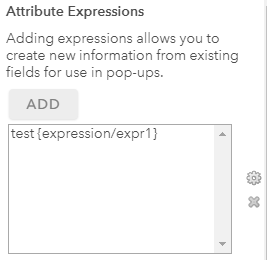
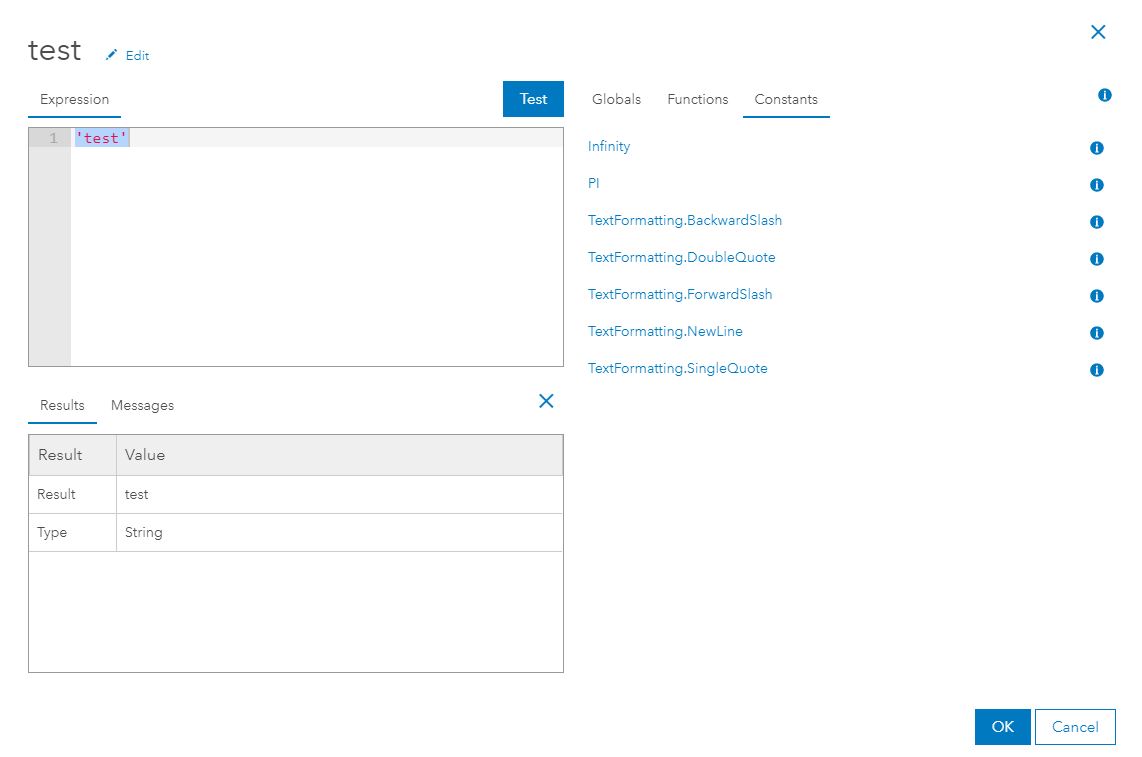
However, when I click on a feature in the web map, the custom attribute I created is no where to be found:
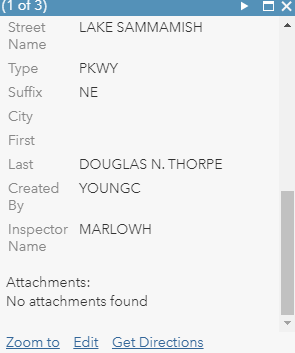
Anyone know how to fix this?

