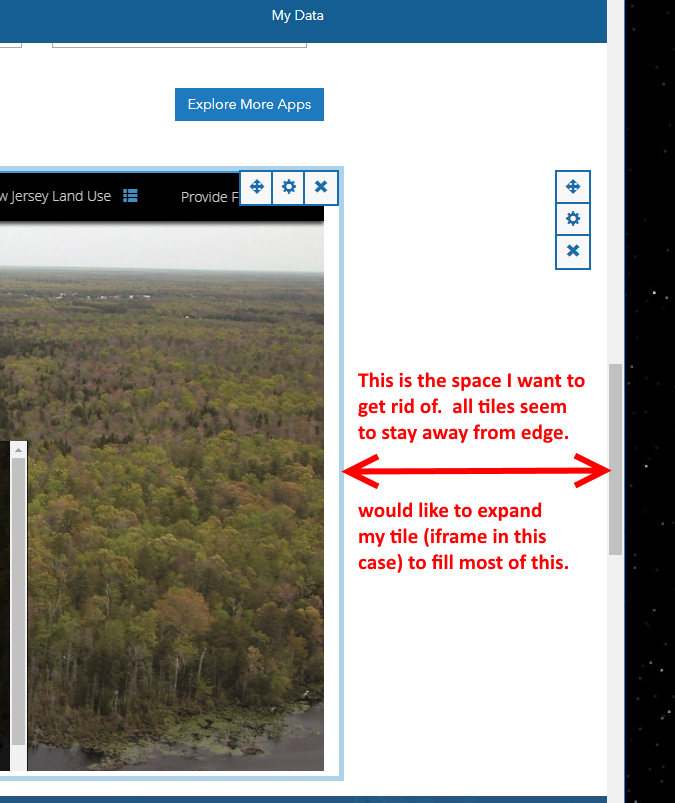
In the page editor, I would like to use the whole (or more of the) row width for the iframe I am dropping in the row. Right now maybe 15% of the row is a margin, I would like to lower that to say 5% to give my iframe more width.
See pic below (and attached just in case). Perhaps there is some magic css I can add?
Thanks,
Tom S.
Answering my own question after conferring with some folks....
The short answer is no, I cannot expand my tile/card to fill this margin in my row. That's an architecture decision in order to make the whole design experience easier for users (I may be using wrong words but that is the gist of it).
Tom
Is this still the case? I want to add a dashboard in an iframe and it would look much better filling the width.
It is but it's on our near term roadmap to make significant improvements to the site editor--of those improvements planned we have changes in mind for the row card (and this is one of them!)
Are we there yet?
I cheated my way around this limitation by adding an empty text box at the bottom that has:
<style>.container { width: 100%;}</style>
It allows me to push the boundary of the container
http://gis-grey.opendata.arcgis.com/pages/road-conditions
Angemeldete Mitglieder können Beiträge verfassen, Updates folgen und mehr. Neu hier? Registriere ein kostenloses Konto.
Find useful guides, FAQs, and documents to help you navigate and make the most of Esri Community.