I have problem with configure layout of my experience builder app because of blocks. I can't find out what these blocks are and how it works.
Sometimes, when I insert a widget to layout, new block is created like parent widget for the new one. But I don't understand, when it happens and when not. For example if I have section widget and i want to insert a list to one view and a feature info to second, I make also blocks.
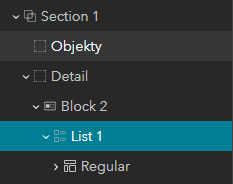
But if I start with Map view template, There is also section with list and feature info, but without blocks!
 I tried it with a row widget same as it here, but it didn't help.
So, what is problem with blocks? Sometimes (not everytime) blocks have empty style properties, so I can't set their size by percent, stretch or auto. I can change size manually but after it my content doesn't change size automatically by different display rosolution.
For exaple I want to have fixed panel section widget (with 100 % height) with 2 views in it, in first view I want to have list (100 % height of section). How i can do it with blocks or how can I delete blocks or how can I set height to automatically created blocks?

.png)