How can I change "Find address or place" to "search" in the CSS? Can I override Esri's main.css file?

I put in "content: 'search;'" here. There was no change.
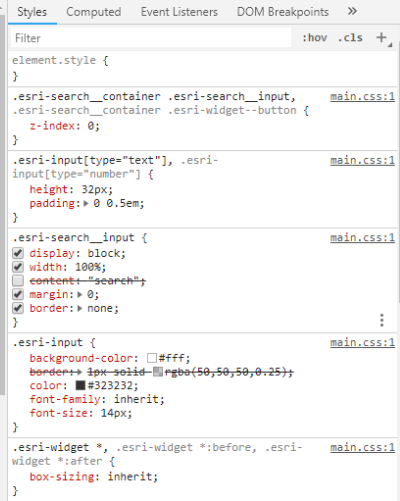
Here's where it seems to be in one of my CSS files.
<SPAN class="selector token">@media (max-width: 480px)
.esri-input.esri-search__input</SPAN> <SPAN class="punctuation token">{</SPAN>
<SPAN class="property token">visibility</SPAN><SPAN class="punctuation token">:</SPAN> visible<SPAN class="punctuation token">;</SPAN>
<SPAN class="property token">font-size</SPAN><SPAN class="punctuation token">:</SPAN> 12px<SPAN class="punctuation token">;</SPAN>
<SPAN class="property token">margin-right</SPAN><SPAN class="punctuation token">:</SPAN> 0px<SPAN class="punctuation token">;</SPAN>
<SPAN class="punctuation token">}</SPAN><SPAN class="line-numbers-rows"><SPAN></SPAN><SPAN></SPAN><SPAN></SPAN><SPAN></SPAN><SPAN></SPAN><SPAN></SPAN></SPAN>I tried this but there was no change:
<SPAN class="property token">content</SPAN><SPAN class="punctuation token">:</SPAN> <SPAN class="string token">"search"</SPAN> <SPAN class="important token">!important</SPAN><SPAN class="punctuation token">;</SPAN><SPAN class="line-numbers-rows"><SPAN></SPAN></SPAN>



