As a follow up to an early post where the Create Locator tool in ArcGIS 2.4 is failing for me due to Null Geometry in two point features, I'm trying to find those records and not select them. The initial data source is an Enter Geodatabase (aka SDE) point feature class, however I make a selection on those records based on a specific requirement and copy just those features to a scratch file geodatabase. I'd like to avoid the null geometry points as part of that selection process as well. That's where I'm getting stuck.
I ran the check geometry tool on my file geodatabase feature class and it returns 2 records; that tool creates a table of problems, and I can identify the two records easily with a relate:
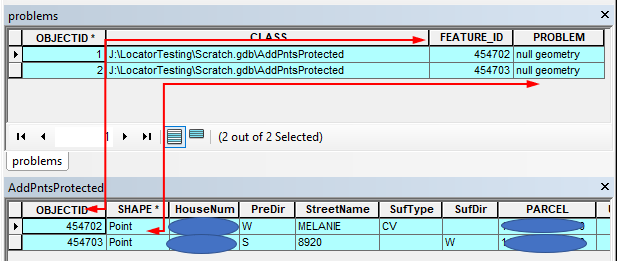
In this post, Joshua Bixby suggests a snippet of code to delete those records. Rather than delete, I just tried to see I a search cursor can find them, but I get no returns:
import arcpy
arcpy.env.workspace = r'J:\LocatorTesting\Scratch.gdb'
fc = 'AddPntsProtected'
fields = ['SHAPE@']
with arcpy.da.SearchCursor(fc,fields)as cursor:
for row in cursor:
if row is None:
print('Found it')<SPAN class="line-numbers-rows"><SPAN></SPAN><SPAN></SPAN><SPAN></SPAN><SPAN></SPAN><SPAN></SPAN><SPAN></SPAN><SPAN></SPAN><SPAN></SPAN><SPAN></SPAN><SPAN></SPAN></SPAN>I altered line 6 to 'SHAPE@XY' without success; tried 'SHAPE@X'; tried 'SHAPE@Y'; all without success. How can I isolate the two problem records from the original selection I make to the EGDB?
Eric Anderson
Edited to add:
This shows some promise as the 'SHAPE@XY' returns a tuple, so if I tease either X or Y out for None, I should be good to go:
arcpy<SPAN class="punctuation token">.</SPAN>env<SPAN class="punctuation token">.</SPAN>workspace <SPAN class="operator token">=</SPAN> r<SPAN class="string token">'J:\LocatorTesting\Scratch.gdb'</SPAN>
fc <SPAN class="operator token">=</SPAN> <SPAN class="string token">'AddPntsProtected'</SPAN>
fields <SPAN class="operator token">=</SPAN> <SPAN class="punctuation token">[</SPAN><SPAN class="string token">'OBJECTID'</SPAN><SPAN class="punctuation token">,</SPAN><SPAN class="string token">'SHAPE@XY'</SPAN><SPAN class="punctuation token">]</SPAN>
<SPAN class="keyword token">with</SPAN> arcpy<SPAN class="punctuation token">.</SPAN>da<SPAN class="punctuation token">.</SPAN>SearchCursor<SPAN class="punctuation token">(</SPAN>fc<SPAN class="punctuation token">,</SPAN>fields<SPAN class="punctuation token">)</SPAN><SPAN class="keyword token">as</SPAN> cursor<SPAN class="punctuation token">:</SPAN>
<SPAN class="keyword token">for</SPAN> row <SPAN class="keyword token">in</SPAN> cursor<SPAN class="punctuation token">:</SPAN>
<SPAN class="keyword token">if</SPAN> row<SPAN class="punctuation token">[</SPAN><SPAN class="number token">1</SPAN><SPAN class="punctuation token">]</SPAN><SPAN class="punctuation token">[</SPAN><SPAN class="number token">1</SPAN><SPAN class="punctuation token">]</SPAN> <SPAN class="operator token">==</SPAN> None<SPAN class="punctuation token">:</SPAN>
<SPAN class="keyword token">print</SPAN><SPAN class="punctuation token">(</SPAN>row<SPAN class="punctuation token">[</SPAN><SPAN class="number token">0</SPAN><SPAN class="punctuation token">]</SPAN><SPAN class="punctuation token">)</SPAN>
<SPAN class="number token">454702</SPAN>
<SPAN class="number token">454703</SPAN><SPAN class="line-numbers-rows"><SPAN></SPAN><SPAN></SPAN><SPAN></SPAN><SPAN></SPAN><SPAN></SPAN><SPAN></SPAN><SPAN></SPAN><SPAN></SPAN><SPAN></SPAN><SPAN></SPAN></SPAN>

