In a multi-map application, when an area is drawn on a graphics overlay, the background map is no longer displayed, instead you see a strange combination of letters and graphics.
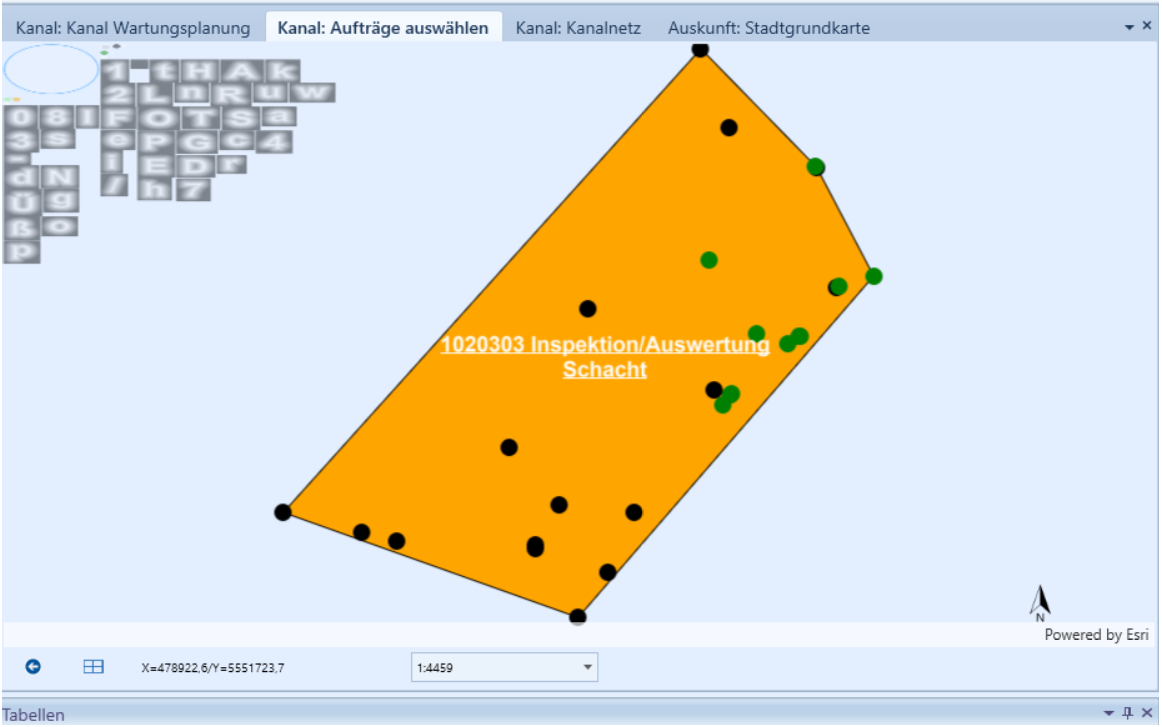
The application layout is as follows: Multiple map instances are active on different user controls. Each map user control is isolated from the others and has its own graphics overlays, graphics are not shared between map instances.
The following procedure always leads to this state:
1: Draw point and area graphics on graphics overlays on Map1.
2: Open Map2 in another tab, also draw point and area graphics on Map2
3: Switch back to Map1, draw point and area graphics, the graphics overlays are drawn but the actual map is no longer drawn.
Please, see also the short video attachment.
This happens on multiple workstations with different graphics cards. The app is compiled against ArcGIS Runtime .NET 100.8. The app ist a successor of our Runtime 10.2.7 application, the Graphics-Overlay part was completely rewritten since we used Graphics-Layers in the previous version.
Does anybody have an idea what is happening here or how one could get behind it?
Many thanks for any hint in any direction and have a great day.
Volker


