Hi guys,
What is sounds very strange to me has probably a meaning for an expert in SQL or in the attribute selection in ArcGIS.
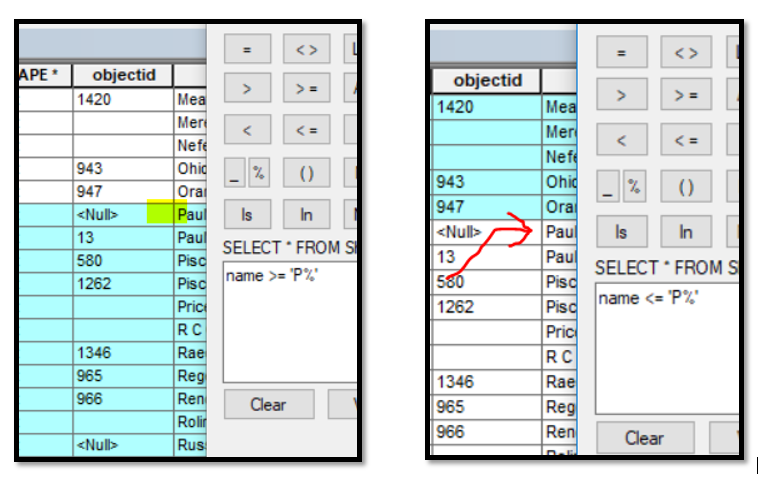
Why, if I search for all the records "greater or equal than" a letter, the letter is included in the search but if I search for "smaller or equal than" a letter, this is excluded?
It works the same either with or without %.
Thanks.
Try name <= 'Pz"
This will find everything that start with a P (accept when it start with Pz) . I do not remember what is the next ascii after z
Have fun
Mody
I encourage you to read sql - Equals(=) vs. LIKE - Stack Overflow, I think it will help you understand your results.
Personally I use coding when I am string comparing stuff using < > operators on letters..... then I can compare numbers!
Convert string to ASCII value python - Stack Overflow
Without the wildcard you would be comparing ascii value of P to ascii value of P so "in a sense" you are filtering name >= 80 or name <= 80.
Please bear in mind a space also has a value....and in some database would influence the results: P[space] <> P "P " <> "P>.
So technically my answer to you is yes....
However it can get complicated real quickly with other bumps in the road that I did not mention --- character sets that you are using will have some influence ... My assumption you are using the standard Latin-1 set. Another bump in road is the database you are using.... some database use a dictionary for string comparison and others use a binary operation. So in dictionary sense my example with space would not be correct "P " = "P" whereas in a database using binary operations my answer would be correct "P " <> "P". I was trying real hard in keeping the answer simple..... When you introduce "NULL" values there are even more issues!
I just tried it with <= 'P%' on some street names; I got two streets named 'P' and no other streets that start with 'P'.
I can get ALL the streets that start with 'P' using StreetName < 'Q' and of course all the others that go along with that.
To get all the streets that start with 'P' long with all streets less than 'P' I would use:
StreetName <= 'P%' or StreetName like 'P%'
What is your objective with these queries?
Pan gis
Thanks for your replies
Joe
even if I drop the % the result I get is exactly the same >= will include P and <= will exclude it.
A bit naive as question maybe, but if I type = my brain expects to get the "P" anyway, but my brain doesn't work in SQL.
Ted ,
you opened the door of a new world
Would you answer apply without considering the wildcard but the simple P?
(Maybe you already answer here above but I need you to confirm )
I checked the lowercase and it is here!! :
It is because SQL compares strings by Ascii Values when using comparison operators. If you insert a wildcard -- the representative strings returned are included.
for example
"p" > "P" would return true -- the decimal value for "p" is 112 and the decimal value for "P" is 80
name >= "P%" would compare name with the returned values of "Pxxxxxx" So "P" by itself will be excluded, "Paulding" would be included as well as "p" (lower case has a higher ascii value than uppercase).
Drop the % sign in both of your queries. Instead of value >= 'P%' just use >= 'P' That will get you everything that starts with 'P' through Z.
If you use <= 'P', you'll get everything from A-P as well as those values that start with 0-9.
I use < 'A' all the time to find numerically 'named' streets...
Angemeldete Mitglieder können Beiträge verfassen, Updates folgen und mehr. Neu hier? Registriere ein kostenloses Konto.
Find useful guides, FAQs, and documents to help you navigate and make the most of Esri Community.