Hi all,
The question is about ArcGIS Pro authentication however it is an issue with Portal configuration, that's why I am posting my question here in Portal group. The issue is that ArcGIS Pro is just waiting for authentication for a long time without any success.
At first let me describe the case when Pro can start successfully: when Pro is started from a Windows PC with licensing configuration as below.
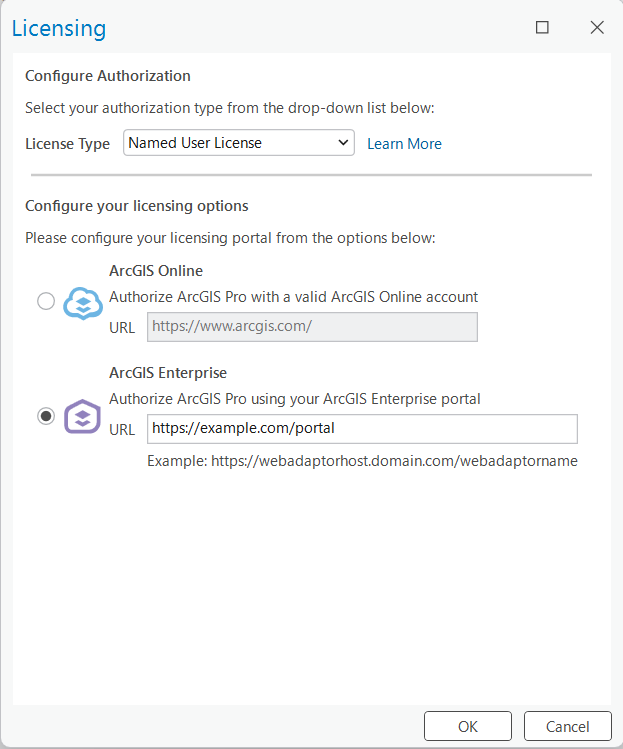
And next case, for some test we need to install ArcGIS Pro on the same server machine with the Portal. However when I start Pro on this machine the authentication just shows an authentication waiting screen. The authentication step is not finished and ArcGIS Pro does not show its menu screen.
Configuration of the server where Portal and Pro are installed is as follows:
Enterprise 11.5 Portal for ArcGIS
Web Adaptor is not installed
The server machine is located in a private network
Portal is running on https://local-domain-name:7443/arcgis
WebContextURL configuration: {"WebContextURL": "https://example.com/portal"}
The domain example.com can be publicly accessed however the URL is not available when accessing from the local machine.
How to enable ArcGIS Pro authentication with the above configuration? Is Web Adaptor required to redirect https://local-domain-name:7443/arcgis to https://example.com/portal on the local machine?
Many thanks

