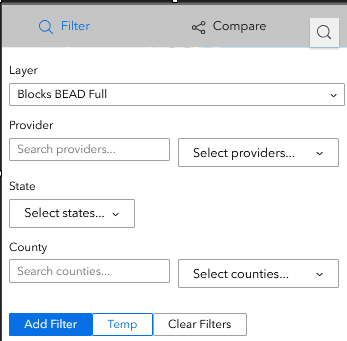
Hello all, I made a custom filter widget and my filters keep disappearing when I interact with the map, here's the workflow that triggers the issue:
1. First I apply a filter for Ohio with my custom widget
2. Then I click a feature to test the persistence
3. Then I clear the filters so it shows the full map again
4. Then I apply a Michigan filter with custom widget
5. After I click a Michigan feature, it unexpectedly reverts to the Ohio filter.
This is obviously really frustrating, if I want to switch between different filters and examine the data in the map it will keep reverting back to the first filter I clicked a feature from. So clicking a feature for the first time stores the filtered map state in some type of cache and it keeps reloading it whenever I try to interact with another filtered map.
So my question is: is there a proper way to do this? Ideally I'd like my custom filter widget to communicate with the native Filter Widget to create filters but I'm new to custom widgets and can't find any information on how to do that. Thank you for your help.
// Applies filter to BOTH DataSource and Visual Layer for persistence + immediate feedback
export const applyPersistentFilter = async (
    layerInfo: LayerInfo,
    filter: string,
    widgetId: string
): Promise<boolean> => {
    try {
        // Step 1: Apply through Experience Builder's DataSource system (for persistence)
        const dataSourceSuccess = await applyFilterThroughDataSource(layerInfo, filter, widgetId)

        // Step 2: Apply to visual layer (for immediate map update)
        const visualSuccess = applyFilterToVisualLayer(layerInfo, filter)

        return dataSourceSuccess && visualSuccess
    } catch (error) {
        console.error('Error applying persistent filter:', error)
        return false
    }
}

// DataSource persistence method
const applyFilterThroughDataSource = async (layerInfo: LayerInfo, filter: string, widgetId: string): Promise<boolean> => {
    const dsManager = DataSourceManager.getInstance()
    const allDataSources = dsManager.getDataSources()

    // Find WEB_MAP DataSource
    let webMapDataSource: DataSource | null = null
    for (const [dsId, dataSource] of Object.entries(allDataSources)) {
        const dsJson = dataSource.getDataSourceJson()
        if (dsJson.type === 'WEB_MAP') {
            webMapDataSource = dataSource
            break
        }
    }

    if (webMapDataSource) {
        const webMapDs = webMapDataSource as any
        // Find target layer in DataSource map
        webMapDs.map.allLayers.forEach((layer: any) => {
            if (layer.id === layerInfo.id) {
                layer.definitionExpression = filter
            }
        })

        // Publish filter message to notify other widgets
        MessageManager.getInstance().publishMessage(
            new DataSourceFilterChangeMessage(widgetId, [webMapDataSource.id])
        )
    }
}

// Visual layer immediate update
const applyFilterToVisualLayer = (layerInfo: LayerInfo, filter: string): boolean => {
    layerInfo.lyr.definitionExpression = filter
    return true
}




