I'm working with an Experience Builder app that includes a map with two main layers:
HC_footprints_... – a polygon layer containing various construction project records
Georeferenced Imagery – a group layer that includes georeferenced PDFs and CAD files, including one specific PDF titled PDF_SK_1G...
What I’m trying to do:
When a user clicks on a specific polygon in the HC_footprints_... layer, a pop-up appears. Within that pop-up, I want to add a button (or similar option) that, when clicked, will turn on the corresponding PDF layer from the Georeferenced Imagery group layer.
If I cannot do it in a pop-up I believe it can be accomplished with a List, Button, or Feature widget, but I cannot figure out how to link everything.
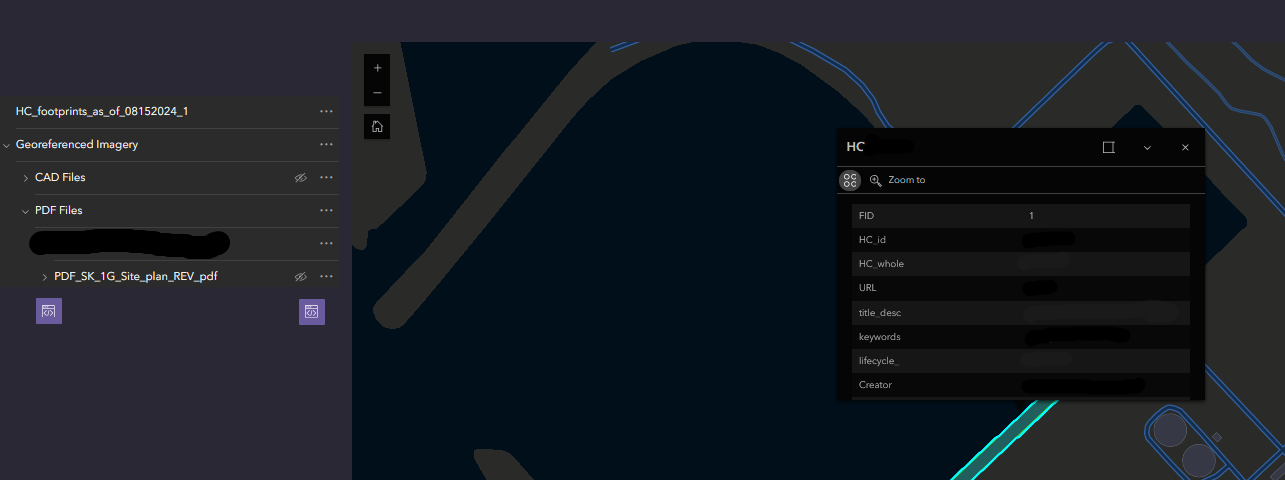
For example, in the image above, I’ve clicked on a project titled HC from the HC_footprints_... layer. I want a button or interactive element in the pop-up that will automatically turn on the PDF_SK_1G... layer so the user doesn’t need to manually go into the Contents panel to find and toggle it. Like I said above, if a popup cannot be used, how can I set up a list or a button widget to it?
This would streamline the user experience by allowing direct control of the PDF visibility from the pop-up itself.
I cannot figure out if I need to build something into the Pop-up window in Map Viewer or if there is a widget in Experience Builder that will do this. The Embed option just opens the PDF in a new window but does not turn the PDF on.
Any assistance would be appreciated. Thank you.

