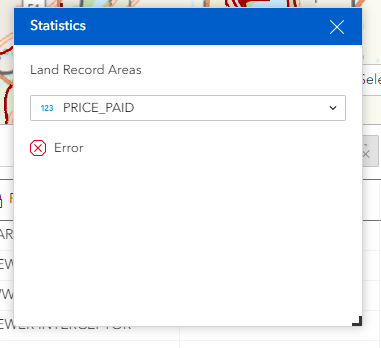
The "statistics" tool within the Table widget doesn't seem to be working - an error message shows up whenever the user selects a field.
This issue is occurring for multiple layers in different apps within our organization.
Any suggestions?
edit: this is in ArcGIS Enterprise 11.3
I am experiencing the same issue. I have three double type fields in the layer that do indeed appear in the drop-down options, but after any is selected the error immediately appears.
We’d be happy to investigate further if you could provide a reproducible sample data link. Thank you!
Here's one of the affected apps: Public Parcels - Metro Communities
Hi @TianWen - wondering if there's any suggestions from Esri on a solution to this!
FYI: We ended up opening a ticket with Esri support and they confirmed that this is a bug affecting the Table and Map Layers widgets - hopefully it will be fixed in an upcoming release. We found that the issue only occurs for referenced data...the statistics tool works fine with hosted data or Living Atlas layers. @katzb
Thanks so much for following up with me about that, very appreciated!
Also having this issue in Enterprise 11.3 with SQL EDGB layers. If this is the bug (BUG-000168610), ESRI is saying it is "as-designed." The additional information makes little sense. Interested if anyone else has found a solution or is still experiencing this.
We are running on Enterprise 11.5 but have the same issue. Statistics not working on any referenced layer published from a SQL database. Note: This is a not an Esri Geodatabase.
Statistics do work in ArcGIS Pro, both with direct connection to the database or adding a layer to a map through the REST URL with layer ID.
Statistics do also work with hosted feature layers, or layers published from local file geodatabase.
I agree, the additional information doesn't make sense. It reads like they found the source, but it's not like a regular user can change the behavior of a default experience functionality...
EDIT: I tried a query without the outStatisticFieldName and it works fine. So this does not seem to be the same bug.
11.3 and using EGDBs I'm getting the exact same behaviour.
Hosted feature layers function as expected, but published feature classes referencing data on our SQL database throw an error in Experience Builder. My initial suspicion was that it may have been caused by a desync in our EGDB versions but I observed the same error with features from EGDB versions 11.0.0.3.00, 10.9.2.8, and 11.2.049743.
Each failure shows up in the Server manager as "General geodatabase error occured."
Not a lot to go on, and no solution yet, but figured I'd throw my results into this thread in case it helps anyone narrow down the cause in the future.
I'll update this post if I figure anything out.
@Jianxia
We are experiencing the same issue with Enterprise 11.5. The statistics using the reference/feature service are erroring out. Please give us a patch to address this issue.
Slightly off topic, but I want to note that because Experience Builder (ExB) has not yet caught up with Web AppBuilder functionality that we heavily rely on, we are unable to install newer versions of Enterprise (12 and above) to make bugs and widget limitations a non-issue. This is because Esri does not allow for the parallel existence of the two applications beyond Enterprise 11.5. As a result, patches for 11.5 that address ExB widget limitations and bugs would be immensely helpful.
This would ensure that when we eventually upgrade Enterprise to 12 or later, we will have already adopted ExB in 11.5, making the transition away from Web AppBuilder minimal in impact.
https://community.esri.com/t5/arcgis-experience-builder-ideas/add-split-merge-circle-copy-in-edit-widget/idi-p/1147136/page/4#comments:~:text=Thank%20you%20for%20the%20update,Respectfully%2C%0AAbi
Thank you for letting us know. Could you please submit the issue through Esri Support? This will ensure your request is officially tracked and help us prioritize the issue in the future releases.
@AbiDhakal , thank you for sharing your request regarding backporting new parity features to ArcGIS Enterprise 11.5. At this time, this enhancement is not part of our current plans. We truly value your feedback and recommend discussing your needs with your Esri account manager, who can help explore possible options and coordinate with the appropriate teams.
@Jianxia I'll make sure to put it in as a BUG if not already in.
Thank you, ma'am.
@Jianxia I'll get on this as well, ma'am.
Were you ever able to figure this out. We have determined that the outStatisticFieldName went from "value" in 10.9.1 to "arcgis_charts_outStatisticFieldName_default_key" in 11.5 and it's throwing an name length error.
Angemeldete Mitglieder können Beiträge verfassen, Updates folgen und mehr. Neu hier? Registriere ein kostenloses Konto.
Find useful guides, FAQs, and documents to help you navigate and make the most of Esri Community.