I'm struggling to update a hosted feature layer in ArcGIS Online from Pro v.3.3.2.
The hosted feature layer was created by a colleague (who is an Administrator) and they are the 'owner' of the item. Once published to ArcGIS Online, the hosted feature layer was shared with a shared update group. I am a member of this shared update group, and I am also an Administrator.
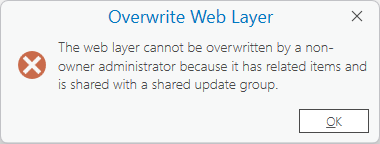
I downloaded a copy of the data from ArcGIS Online and made some minor data edits in Pro. When I try to overwrite the layer (by right clicking on the layer in the contents panel > Sharing > Overwrite web layer), I get the message below at the point that I select the existing layer in our ArcGIS Online organisation that I want to overwrite:
The web layer cannot be overwritten by a non-owner administrator because it has related items and is shared with a shared update group.
I've searched and can't find any information on this specific error. All the requirements listed in the 'Overwrite a web feature layer' help page are met: (https://pro.arcgis.com/en/pro-app/latest/help/sharing/overview/overwrite-a-web-layer.htm)
Regarding the specific error message, the hosted feature layer I am trying to overwrite does not have any related items, but it is shared with a shared update group. Why would sharing an item with a shared update group prevent me from overwriting it? I thought the whole point of shared update groups was to allow multiple users to be able to update the data? Is the problem that I am an administrator?
There are workarounds (I could temporarily unshare the layer with the shared update group, or I could temporarily take ownership of the layer) but I'd like to understand why this doesn't work as I think it should.
Any advice would be greatly received.


