Greetings, I'm trying to create a custom geoprocessing tool. The background:
- I have a polygon dataset "FarmLocations" with a "LocCode" attribute field and an attribute field "Fruits" grown there. Examples of the text entries include "Apples, Cherries", "Apples", "Apples, Walnuts, Peaches", etc.:
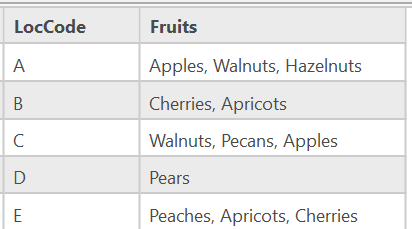
- I have a List of Fruits: ['Apples', 'Walnuts', 'Hazelnuts', 'Cherries', 'Apricots', 'Pecans', 'Pears', 'Peaches', 'Plums']. (This is a list of all of the unique single items that appear in the "Fruits" field of the FarmLocations polygons)
- I'm provided with a Project List as .xlsx that contains a code for location "LocCode" of projects that will be done at FarmLocations. A single farm location may appear more than once in the Project List:
| LocCode | ProjName |
| A | Project 1 |
| B | Project 2 |
| C | Project 3 |
| E | Project 4 |
| G | Project 5 |
| A | Project 6 |
| D | Project 7 |
| C | Project 8 |
| C | Project 9 |
| A | Project 10 |
The desired output: A csv for each fruit in the List of Fruits containing the list of projects that will affect that fruit crop.
My approach:
# imports and environments
import arcpy
from arcpy import da
import csv
arcpy.env.workspace = r'C:\Default.gdb'
workspace = arcpy.env.workspace
arcpy.env.overwriteOutput = True
Locations = workspace + '\FarmLocations'
Field = 'Fruits'
List = ['Apples', 'Walnuts', 'Hazelnuts', 'Cherries', 'Apricots', 'Pecans', 'Pears', 'Peaches', 'Plums']

# join the spatial data to the list of projects
# project table as excel workbook
ProjectTable = r'C:\ProjectList.xlsx\ProjectList$'
JoinField = 'LocCode'
arcpy.management.JoinField(ProjectTable, JoinField, Locations, 'LocCode', ['Fruits'])
# export the joined list as a dbase table
arcpy.conversion.TableToDBASE(ProjectTable, workspace)
JoinedProjList = r'C:\Default.gdb\ProjectList_'

# Loop through the joined project list and identify those projects that contain values from the Fruit List

for item in List:
    if row in JoinedProjList LIKE item:
# query = "'Fruits' LIKE 'Apples'"
# arcpy.management.SelectLayerByAttribute(JoinedProjList, 'NEW_SELECTION', query)
        with open(item, "w", encoding='utf-8') as csvfile:
        csvwriter = csv.writer(csvfile, delimiter = ',', lineterminator = '\n')
        # write header
        fields = ['LocCode', 'ProjName']
        csvwriter.writerow(fields),
        # write selected data to rows
        with arcpy.da.SearchCursor(item, fields) as s_cursor:
            for row in s_cursor:
                csvwriter.writerow()

print("csvs written")
What I've tried: At first I tried using arcpy.management.SelectLayerByAttribute, but then I realized that's probably an extra step and I can just query the "Fruits" field in the joined table for the items in the List; when the search terms are present, I then write that row to a csv. However... I can't figure out the syntax of the SQL query in the for loop to loop over the items in the list as the search terms. I've tried it a bunch of ways, but the following block is where I'm at. (For now, I commented out the use of the SelectLayerByAttribute, but in my tests, outside of the For Loop, I had marginal success with the SelectLayerByAttribute using "'Fruits' LIKE '%Apple%'" as the SQL Where clause.)
Where I'm stuck is right around here:
for item in List:
    if row in JoineProjList LIKE item:

# query = "'Fruits' LIKE 'Apples'"
# arcpy.management.SelectLayerByAttribute(JoinedProjList, 'NEW_SELECTION', query)
So, how can I loop through the items in my List (['Apples', 'Walnuts', 'Hazelnuts', 'Cherries', 'Apricots', 'Pecans', 'Pears', 'Peaches', 'Plums']), searching the "Fruits" field of the joined table for each of the terms in the List, and writing the identified rows to respective csv files with using the "item in List" (e.g. the specific fruit) as the name of the CSV?
I also think I can simply the code by using f string literals, and perhaps I'm already including unnecessary steps (e.g., if I write code to return a feature set, eliminating the need to join the tables...). I'll get there, but first things first. Ideas and feedback welcome.
-r


