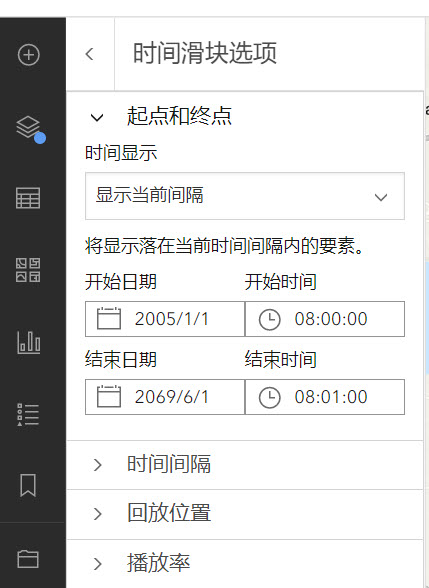
This component is in "calcite-panel" and its scale attribute is set "s" . While it is still not narrow as expected. As the code pen. It works fine in arcgis online web viewer as the screenshot below. This panel is in the "map settings" button clicked. The map contains a feature service with time-slider in my local server.
Or are you saying that the Panel isn't big enough to fit the Input Date Picker range without cutting off the text? You can make the Shell Panel wider using the width-scale attribute:
<calcite-shell-panel width-scale="l" slot="primary-panel" position="start" detached>
Here is a codepen:
https://codepen.io/benesri/pen/XWqNGpJ?editors=1000
Hi @BenElan and @KittyHurley
Thank you for your solutions. I will try to increase the panel width.
Updated the Codepen to include a specified width using pixels to ensure the full placeholder text is visible.
Another option, if it fits the use case, could be to set the layout attribute to "vertical".
<calcite-input-date-picker layout="vertical" range scale="s" overlay-positioning="fixed"></calcite-input-date-picker>
Upon setting the input's stack on top of one another, like so:
Hi @KittyHurley :
The "MM/DD/YYYY" placement in the component is not displayed completely as the screenshot below.
The font-size is part of the web component's shadow DOM, so styles can't be modified so they have consistency when working with components across the design system.
Does the following Codepen modifying the component's width with CSS achieve the anticipated narrow width?
Hi Kitty-Hurley:
The width of the input is decided by "font-size" which is defined in calcite.css file.
I tried to add css to stylize its font-size but not take effect as the codes in code pen..
Hello @baohuachu2. The input-date-picker "scale" attribute modifies the component's sizing, such as its height and text, but not its width.
In this case for consistent styling you could add CSS to the panel's contents, or directly to the input-date-picker component, such as:
<style>
.date-range-panel > * {
  margin: 1rem;
}
</style>

<calcite-panel class="date-range-panel" heading="Date picker test" height-scale="l" dismissible>
  <calcite-label>
  Set the date range
  <calcite-input-date-picker range scale="s" overlay-positioning="fixed">
  </calcite-input-date-picker>
  </calcite-label>
</calcite-panel>
Angemeldete Mitglieder können Beiträge verfassen, Updates folgen und mehr. Neu hier? Registriere ein kostenloses Konto.
Find useful guides, FAQs, and documents to help you navigate and make the most of Esri Community.