In experience builder Map>Tools, if I toggle Select to on, then use the selection tools in Preview, I keep getting polygons selected from nearby where I'm clicking/selecting, but still a fair distance away - it appears to be about 500m.
E.g. below, I clicked around where that red X is, and it selected that polygon to the north/west.
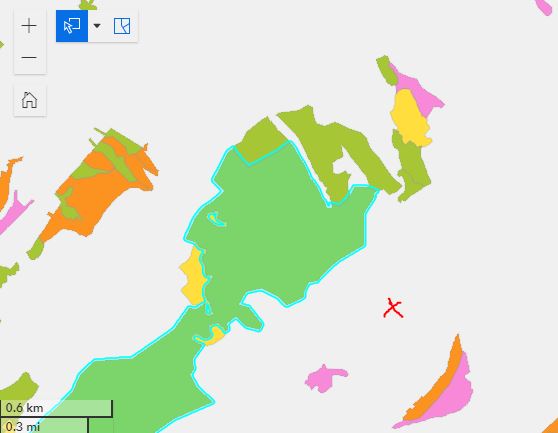
I have the selection mode as "Partially or completely within" and in rectangle mode. If I draw an actual rectangle, it does behave as I would expect, only selecting polygons that are partially or completely within that rectangle. However if I do a single click, that's where I get the nearby polygons selected. It's almost like there's some default hidden buffer being used? Is it possible to change this?
I know there's a different selection tool for points but I think normal user behaviour would be to click a point or draw a rectangle without messing around with their selection tools. (Source: I am an experienced GISer and it still took me a while to figure out where I was going wrong!).

