Hello people,
I am looking for a way to search for a scientific species name and receiving the data from the GBIF api.
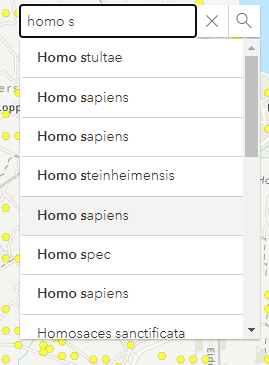
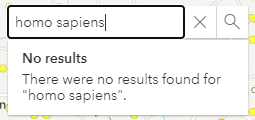
Now I have already implemented auto completion if I search for a scientific name, but selecting the name in the search-widget doesn't parse the result to getResults object.
Is there any way to fix this?

<html>
<head>
    <meta charset="utf-8"/>
    <meta
            name="viewport"
            content="initial-scale=1,maximum-scale=1,user-scalable=no"
    />
    <title>All birds</title>

    <link
            rel="stylesheet"
            href="https://js.arcgis.com/4.17/esri/themes/light/main.css"
    />
    <style>
        html,
        body,
        #viewDiv {
            padding: 0;
            margin: 0;
            height: 100%;
            width: 100%;
        }
    </style>

    <script src="https://js.arcgis.com/4.17/"></script>
    <script src="https://ajax.googleapis.com/ajax/libs/jquery/3.5.1/jquery.min.js"></script>

    <script>
        require([
            "esri/widgets/Search",
            "esri/widgets/Search/SearchSource",
            "esri/Map",
            "esri/request",
            "esri/Color",
            "esri/views/MapView",
            "esri/widgets/LayerList",

            "esri/layers/BaseTileLayer"
        ], function (
            Search,
            SearchSource,
            Map,
            esriRequest,
            Color,
            MapView,
            LayerList,
            BaseTileLayer
        ) {
            // *******************************************************
            // Custom tile layer class code
            // Create a subclass of BaseTileLayer
            // *******************************************************

            var TintLayer = BaseTileLayer.createSubclass({
                properties: {
                    urlTemplate: null,
                    tint: {
                        value: null,
                        type: Color
                    }
                },

                // generate the tile url for a given level, row and column
                getTileUrl: function (level, row, col) {
                    return this.urlTemplate
.replace("{z}", level)
                        .replace("{x}", col)
                        .replace("{y}", row);
                },

                // This method fetches tiles for the specified level and size.
                // Override this method to process the data returned from the server.
                fetchTile: function (level, row, col, options) {
                    // call getTileUrl() method to construct the URL to tiles
                    // for a given level, row and col provided by the LayerView
                    var url = this.getTileUrl(level, row, col);

                    // request for tiles based on the generated url
                    // the signal option ensures that obsolete requests are aborted
                    return esriRequest(url, {
                        responseType: "image",
                        signal: options && options.signal
}).then(
                        function (response) {
                            // when esri request resolves successfully
                            // get the image from the response
                            var image = response.data;
                            var width = this.tileInfo.size[0];
                            var height = this.tileInfo.size[0];

                            // create a canvas with 2D rendering context
                            var canvas = document.createElement("canvas");
                            var context = canvas.getContext("2d");
                            canvas.width = width;
                            canvas.height = height;

                            // Apply the tint color provided by
                            // by the application to the canvas
                            if (this.tint) {
                                // Get a CSS color string in rgba form
                                // representing the tint Color instance.
                                context.fillStyle = this.tint.toCss();
                                context.fillRect(0, 0, width, height);

                                // Applies "difference" blending operation between canvas
                                // and steman tiles. Difference blending operation subtracts
                                // the bottom layer (canvas) from the top layer (tiles) or the
                                // other way round to always get a positive value.
                                context.globalCompositeOperation = "difference";
                            }

                            // Draw the blended image onto the canvas.
                            context.drawImage(image, 0, 0, width, height);

                            return canvas;
                        }.bind(this)
                    );
                }
            });

            // *******************************************************
            // Start of JavaScript application
            // *******************************************************

            // Create a new instance of the TintLayer and set its properties
            var stamenTileLayer = new TintLayer({
                urlTemplate:
                    "https://api.gbif.org/v2/map/occurrence/density/@{z}/{x}/{y}@1x.png?taxonKey=212&bin=hex&hexPerTile=40&style=classic.poly",

                title: "All birds"
            });

            var url = "http://api.gbif.org/v1/species/suggest?datasetKey=d7dddbf4-2cf0-4f39-9b2a-bb099caae36c&q="
            var suffix = "&rank=species"

            var customSearchSource = new SearchSource(
                {
                    placeholder: "Enter Scientific name",
                    getSuggestions: function (params) {
                        // TODO
                        // Make a custom url for the esri request
                        let customUrl = url + params.suggestTerm.replace(/ /g, "%20") + suffix;
                        //console.log(customUrl);
                        var options = {
                            query: {
                                f: "json"
                            },
                            responseType: "json"
                        };

                        return esriRequest(customUrl, options).then
                        (
                            function (results) {
                                // Return the scientific names
                                return results.data.map(function (feature) {
                                        return{
                                            key: "name",
                                            text: feature.species,
                                            // Note: add whatever field you require (i.e. 'canonicalName', 'species', 'genus', etc.)
                                            speciesKey: feature.speciesKey
};
                                    }
                                );
                            }
                        )
                    },
                    getResults: function(params) {
                        // The selected result are stored in the params.suggestResult object
                        console.log('Selected result: ', params);
                        console.log('Species: ', params.suggestResult.text);
                        console.log('Species key: ', params.suggestResult.speciesKey);

                        /* FIXME: when clicking a species, it will show:
                        *   'No results found for <selected species>'
                        * This is because the search action searches the layer data.
                        */

                        // TODO: add logic for retrieving new data and updating the layer
                        // ...
                    }
                }
            );

            // add the new instance of the custom tile layer
            var map = new Map({
                basemap: "topo-vector",
                layers: [stamenTileLayer]
            });

            // create a new scene view and add the map
            var view = new MapView({
                container: "viewDiv",
                map: map,
                center: [6.5665018, 53.2193835],
                zoom: 11
            });

            // create a layer list widget
            var layerList = new LayerList({
                view: view
});

            // Create a SearchWidget
            // Note: added a few settings, all optional.
            const searchWidget = new Search(
                {
                    view: view,
                    sources: [customSearchSource],
                    includeDefaultSources: false,
                    autoSelect: false,
                    locationEnabled: false,
                    minSuggestCharacters: 3,
                    searchAllEnabled: false,
                    suggestionDelay: 300
                }
            );

            view.ui.add(layerList, "top-right");
            view.ui.add(searchWidget, "top-right");

            /* Add events -after- the search has been added to the view */
            searchWidget.viewModel.on("search-complete", function(event){
                // The results are stored in the event Object[]
                // Note: missing species key
                console.log("Selected species: ", event.searchTerm);
                // TODO: add logic for retrieving new data and updating the layer
            });

        });
    </script>
</head>

<body>
<div id="viewDiv"></div>
</body>
</html>

