Hi -
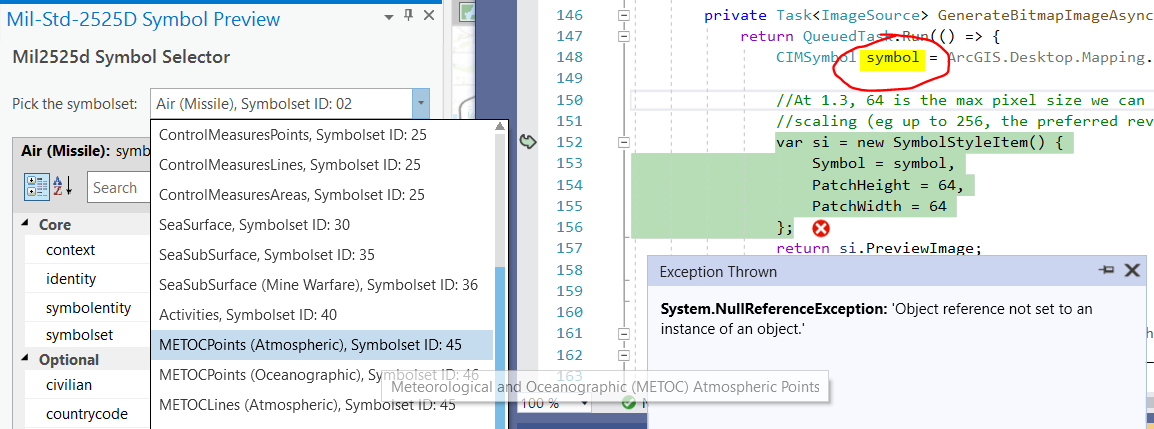
Using Pro 2.7 and data from CommunitySampleData-12-15-2020, when I choose the METOCPoints (Atmospheric), SymbolsetID:45 in the DictionarySymbolPreview sample I get a null reference exception.
I wonder if something's not configured correctly.
Thanks, Kirk
This is probably a separate issue: exception when opening DictionarySymbolView designer (cannot find actipro toolwindow).
Severity Code Description Project File Line Suppression State
Error Type reference cannot find type named '{clr-namespace:ActiproSoftware.Windows.Controls.Docking;assembly=ArcGIS.Desktop.Docking.Wpf}ToolWindow'. DictionarySymbolPreview D:\repos\esri\arcgis-pro-sdk-community-samples\Map-Authoring\DictionarySymbolPreview\UI\DictionarySymbolView.xaml 19
To reproduce:
Open sln, notice nuget packages are broken, so update to 4.0.2 ...
Clean and rebuild, no errors.
Open the DictionarySymbolView in designer and see error.
Kirk, I dug into this a little deeper.
It looks like, in some cases, particular symbolsets have a "000000 - Unspecified" symbol entity as the default. The Atmospheric symbols - symbolset 45 and 46 as examples. So the initial pick of the METOCPoints, Lines, Polys triggers a search for the default entity: "symbolentity 0". Now, I _think_ the GetDictionarySymbol used to return a default symbol for undefined entities?? - but it could just be a bug in the sample - anyway, when I select a "real" entity from the symbolentity drop down (i.e. something other than 000000 - eg 110100), I get the correct symbol retrieved and loaded.
I think the best thing to do is simply wrap the GetDictionarySymbol call in a try/catch to prevent the null symbol being returned from blowing up the dockpane in those cases where an unspecified "000000" symbol is being requested.
private Task<ImageSource> GenerateBitmapImageAsync(Dictionary<string, object> attributes) {
            return QueuedTask.Run(() => {
              try {
                CIMSymbol symbol =
 ArcGIS.Desktop.Mapping.SymbolFactory.Instance.GetDictionarySymbol(
         "mil2525d", attributes);
                var si = new SymbolStyleItem() {
                  Symbol = symbol,
                  PatchHeight = 64,
                  PatchWidth = 64
                };
                return si.PreviewImage;
              }
              catch(NullReferenceException) {
                return null;
              }
            });
        }
Starting with a fresh MilitaryOverlay.aprx from the zip file, I see a ! next to the stylx:
I clicked and browsed for:
"C:\Program Files\ArcGIS\Pro\Resources\Dictionaries\mil2525d\mil2525d.stylx"
and the ! cleared.
Still get null ref exception though.
Hi Kirk, looks like a bug in GetDictionarySymbol. I'll keep u posted.
~Hi Kirk, the sample is designed for use with "mil2525d". To change it you would have to replace that literal string with the name of your dictionary. However, I think the property grid expects mil2525d entities also so that might break also but it's been quite a few years since I wrote that sample and I don't remember all the details.~
scratch that - I see u are using mil2525d. I'm not sure off the top of my head. Looks like the GetDictionarySymbol call does not find your selected symbol and, off the top of my head, I dont know why
Angemeldete Mitglieder können Beiträge verfassen, Updates folgen und mehr. Neu hier? Registriere ein kostenloses Konto.
Find useful guides, FAQs, and documents to help you navigate and make the most of Esri Community.